Your workflow is unique 👨💻 - tell us how you use Dropbox here.
Forum Discussion

RickyW
4 years agoExplorer | Level 4
Can't create new folder in Dropbox folder in Mac
Hi,
I'm on Macbook Pro Big Sur.
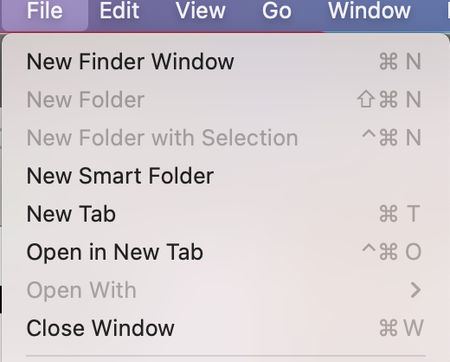
I can't create new folder when I'm inside the Dropbox folder. As you can see, the New Folder option is being greyed out.
This is so frustrating bcs...
RickyW
4 years agoExplorer | Level 4
Hi,
Found the problem. Was using a colleague's computer and she doesn't have the Edit function enabled.

Anna G
3 years agoNew member | Level 2
I'm having the same trouble, but don't know where to find the edit function you said was disabled. Where is that option?
I'm on a MacOS Monterey 12.4 and Dropbox Business.
I can create a new folder in another Finder folder and drop it into the Finder Dropbox folder, but I can't create a new folder directly in the Finder Dropbox folder.
Thanks!
- Jay3 years ago
Dropbox Community Moderator
Hi Anna G, since it appears you're running the new version of Dropbox Business, you might need edit permissions for the team space, which the team admin can grant.

About Create, Upload, and Share
Find help to solve issues with creating, uploading, and sharing files and folders with Dropbox.
The Dropbox Community team is active from Monday to Friday. We try to respond to you as soon as we can, usually within 2 hours.
If you need more help you can view your support options (expected response time for an email or ticket is 24 hours), or contact us on X, Facebook or Instagram.
For more info on available support options for your Dropbox plan, see this article.
If you found the answer to your question in this Community thread, please 'like' the post to say thanks and to let us know it was useful!


