Your workflow is unique 👨💻 - tell us how you use Dropbox here.
Forum Discussion

altenae
8 years agoHelpful | Level 5
Changes Bitrate and File size after sync.
I hope someone is able to tell me what is going on here....
I have made a 4k 60PFS recording on my iphone 8 plus.
The file properties of this mov file is around 42 MB an the Bitrat...
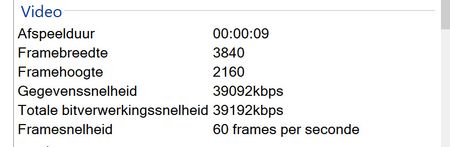
 8 years agoWow... you are 100% correct.
Seems the Original file is not playing very well on my computer. (high specs...;latest I7 and one of the fastest GeForce Card and still choppy)
Thank you very much for helping me out.
Now I know exactly what is going on.
Thanks !!

Akay Dropbox Staff
8 years agoDropbox StaffHi altenae
Thank you for your quick response - that is very useful information. I would like to clarify a few more things:
- Could you provide more information on how you added the file to Dropbox via "share" ? Is it from the iOS Photos app using the "share" option on a video, then selecting "Save to Dropbox" as the option there?
- Could you provide more information on how you added the file to Google Drive? Is it directly from inside the Google Drive app via the blue plus button, or is it via the "share" option in the iOS Photos app, and then selecting Google Drive as the destination?
Thanks,
Akay
altenae
8 years agoHelpful | Level 5
Akay wrote:
Hi altenae
Thank you for your quick response - that is very useful information. I would like to clarify a few more things:
- Could you provide more information on how you added the file to Dropbox via "share" ? Is it from the iOS Photos app using the "share" option on a video, then selecting "Save to Dropbox" as the option there?
- Could you provide more information on how you added the file to Google Drive? Is it directly from inside the Google Drive app via the blue plus button, or is it via the "share" option in the iOS Photos app, and then selecting Google Drive as the destination?
Thanks,
Akay
Open gallery => Select the movie => Sharebutton => choose "add ro Dropbox" ==> Correct upload and not changed !!
Open dropbox => Use the "+" button => Uploaded files is wrong !! (Changed size due to change of the bitrate)
Google drive seems to do the same !!
So share from gallery = correct
Add direct from the app = not correct
- Akay8 years ago
We investigated this, and there is no bug here. Dropbox is actually uploading the correct file, as is Google Drive. It's just the same file in two different formats.
- If you upload the 4k60fps video to Dropbox via the + button in the app, it uploads the original HEVC (H.265) encoded video that is provided to Dropbox via the native iOS api's. This is the highest bitrate possible video, and it's identical to the video that's inside your iPhone 8 plus. This is the 64MB video you are seeing. You will also see this same video if you set your iPhones "Transfer to PC/MAC" setting to "Keep Original" and transfer the video to your computer.
- If you upload the 4k60fps video to Dropbox from the iOS Photos app using the Share action, the Photos app will transcode the video to a H.264 video which has a lower bitrate. This is the 42MB video you are seeing.
- The video uploaded to Google Drive is also the H.264 video with a lower frame rate, and this should be identical to the 42MB video uploaded to Dropbox. If you upload the video to Google Drive via the + button in Google Drive I believe you will see the 64MB video upload.
- I acknowledge that the playback of the HEVC 64MB video on Dropbox.com is somewhat choppy. The video file itself is fine. This is related to the extremely high bitrate of the video and the corresponding CPU-intensive compression codec used. I believe only the iPhone 8 has great hardware-accelerated encode/decode for this codec so far. I've reported this issue and asked the relevant engineers to investigate.
All in all, the 64MB video in your Dropbox is the "highest quality" original raw video from your phone, with identical quality, resolution and bitrate to the one inside your phone. However the 42MB video will likely play back better on devices other than your iPhone, and will be more "compatible" if you want to share with others because the codec used there (H.264) is much more supported at this time.
I hope this information is helpful.
Akay
- altenae8 years agoHelpful | Level 5Wow... you are 100% correct.
Seems the Original file is not playing very well on my computer. (high specs...;latest I7 and one of the fastest GeForce Card and still choppy)
Thank you very much for helping me out.
Now I know exactly what is going on.
Thanks !!
About Create, upload, and share
Find help to solve issues with creating, uploading, and sharing files and folders in Dropbox. Get support and advice from the Dropbox Community.
The Dropbox Community team is active from Monday to Friday. We try to respond to you as soon as we can, usually within 2 hours.
If you need more help you can view your support options (expected response time for an email or ticket is 24 hours), or contact us on X, Facebook or Instagram.
For more info on available support options for your Dropbox plan, see this article.
If you found the answer to your question in this Community thread, please 'like' the post to say thanks and to let us know it was useful!


