Your workflow is unique 👨💻 - tell us how you use Dropbox here.
Forum Discussion

Research_Mex
5 months agoExplorer | Level 3
Data missing from a shared Excel file in Dropbox
Hello all,
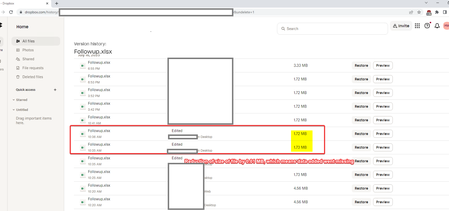
We are having an issue where the excel files modified through Dropbox sync are losing data when checked the next or following day. This has happened around twice in the last one month. ...
- 5 months ago
I would recommend that the user quit all other open apps and services on their machine, aside from Excel and Dropbox, and try editing the file again to see if the changes get reverted this time.
This would help to determine if another program is causing these changes, or if Excel would be the cause of this, as Dropbox can't revert changes without the user's permission.

Research_Mex
5 months agoExplorer | Level 3
Hello Jay, thanks for taking time to respond. Details below:
- The file was edited by 'User A' himself , as in this excel he gathers data from some other source manually and updates here. Since all data can't be updated in one go, he often saves it row by row, or some rows at a time.
- User B accessed the excel files from Dropbox local folder which is synced to another remote PC at user B's location.
- "Are there any other apps or services which could prevent or revert changes to a file after it was edited?" - We guess not, as we don't make much changes to those PCs either at user A's or at B's end.

Jay Dropbox Community Moderator
5 months agoDropbox Community ModeratorThanks for the info.
As the events page showed that the file was edited twice, this means that something on User A's machine reverted the changes to the Excel file and then saved the changes, which then synced to Dropbox. As to what that could be, we couldn't say.
Does this issue only occur for User A, or do other users also experience similar issues?
- Research_Mex5 months agoExplorer | Level 3
You're welcome. On both the occasions, it involved User A editing the file, not for any other users.
- Jay5 months ago
I would recommend that the user quit all other open apps and services on their machine, aside from Excel and Dropbox, and try editing the file again to see if the changes get reverted this time.
This would help to determine if another program is causing these changes, or if Excel would be the cause of this, as Dropbox can't revert changes without the user's permission.
About Create, upload, and share
Find help to solve issues with creating, uploading, and sharing files and folders in Dropbox. Get support and advice from the Dropbox Community.
The Dropbox Community team is active from Monday to Friday. We try to respond to you as soon as we can, usually within 2 hours.
If you need more help you can view your support options (expected response time for an email or ticket is 24 hours), or contact us on X, Facebook or Instagram.
For more info on available support options for your Dropbox plan, see this article.
If you found the answer to your question in this Community thread, please 'like' the post to say thanks and to let us know it was useful!


