Need to see if your shared folder is taking up space on your dropbox 👨💻? Find out how to check here.
Forum Discussion
bobv
5 years agoExplorer | Level 4
Dropbox and Parallels
My Mac (iOS 10.12.6) is running Parallels (v15.1.4) so I have a Virtual Machine of Windows 10 Home.
I have Dropbox installed and it shows like this on my Mac: but it shows on the PC side...
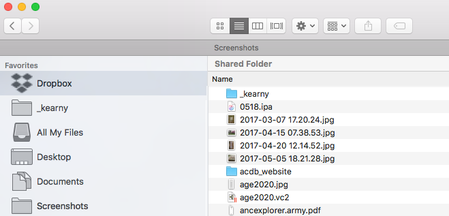
Walter
Dropbox Community Moderator
5 years agoQuick follow up here as the screenshot wasn't visible at first bobv.
Could you reboot your machine and let me know if you still can't get the mentioned buttons to show up?
Is the app installed on this machine with admin privileges?
bobv
5 years agoExplorer | Level 4
No change after rebooting. Option/Alt has no affect on the Accounts tab on the Mac side.
It still says that it is syncing the same number of files.
I installed many moons ago but I have only had this syncing problem in the last few months. Is there a way to tell if it is installed with admin privileges?
-Bob
- Daphne5 years ago
Dropbox Community Moderator
If you're not sure if the app was installed with admin permissions, I'd suggest doing a simple reinstall of the desktop app to make sure this is the case.
Before uninstalling, you can also unlink the app from your account as this is another step we can take to try resolve the syncing issue.
Once you've unlinked and uninstalled the app on the Mac side, you can then go ahead with reinstalling the app with admin permissions, as outlined here.
- bobv5 years agoExplorer | Level 4
I appreciate this advice but I've held off implementing it because it scares me. But now I'm finished with some major projects so now seems the time to do it.
Are you suggesting that I uninstall Dropbox from both the Mac and PC sides?
What risks am I taking that I'll lose something? That is, in the 5000+ cases that the two sides are not exact mirrors of each other, what will the reinstall do when it encounters two different versions on the same file?
Thanks again.
- Daphne5 years ago
Dropbox Community Moderator
I see, I completely understand bobv!
Since the Windows side is showing that it's "up to date", this would mean that the files there would be the ones synced to your Dropbox account online.
As we don't know how long the files haven't synced from the Mac side, we don't want to potentially overwrite the synced data with older versions.
Before reinstalling on the Mac, I would suggest keeping/making a copy of any recently edited files that you edited from the Mac (that aren't synced with your Dropbox account online).
Then, you can remove the Dropbox folder from the Mac or rename it, so that when you reinstall you can setup the app as new, and sync the data down from your account online.
If you have enough space on your computer, you can keep the whole "old" Dropbox folder on your computer and just rename it before reinstalling the app.
That way, after the app has finished syncing your files down to the Mac side, you can copy over any files that you have a more recent version of from the "old" Dropbox folder.
About Create, upload, and share
Find help to solve issues with creating, uploading, and sharing files and folders in Dropbox. Get support and advice from the Dropbox Community.
The Dropbox Community team is active from Monday to Friday. We try to respond to you as soon as we can, usually within 2 hours.
If you need more help you can view your support options (expected response time for an email or ticket is 24 hours), or contact us on X, Facebook or Instagram.
For more info on available support options for your Dropbox plan, see this article.
If you found the answer to your question in this Community thread, please 'like' the post to say thanks and to let us know it was useful!