Your workflow is unique 👨💻 - tell us how you use Dropbox here.
Forum Discussion

Catalina1
1 year agoHelpful | Level 5
Dropbox Backup stuck updating to new version - can't dismiss the update window on macOS
Hello,
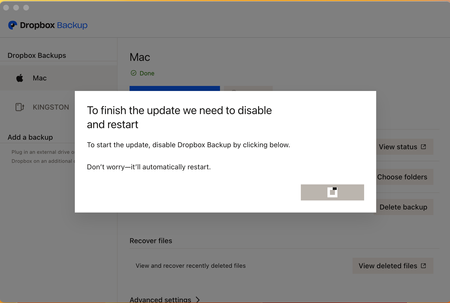
I store all of my files in Dropbox, including those on my desktop and downloads. Two days ago, I was prompted with a window from Dropbox, asking me to accept the new Dropbox Backup feature. ...

Nancy Dropbox Community Moderator
1 year agoDropbox Community ModeratorThanks for your post, Catalina1! Let’s check this.
Can you clarify the current syncing status and app version of your desktop app?
From your screenshot, it looks like Dropbox is trying to update the Backup feature, but the update hasn’t finished just yet.
I’d also like a screenshot of what you see when clicking on this link.
Ping me, when you’ve got more info.

md24
1 year agoExplorer | Level 3
I'm having the same problem, did you find a solution you could share?
About Create, Upload, and Share
Find help to solve issues with creating, uploading, and sharing files and folders with Dropbox.
The Dropbox Community team is active from Monday to Friday. We try to respond to you as soon as we can, usually within 2 hours.
If you need more help you can view your support options (expected response time for an email or ticket is 24 hours), or contact us on X, Facebook or Instagram.
For more info on available support options for your Dropbox plan, see this article.
If you found the answer to your question in this Community thread, please 'like' the post to say thanks and to let us know it was useful!


