Your workflow is unique 👨💻 - tell us how you use Dropbox here.
Forum Discussion

cloudstoragelover
2 years agoHelpful | Level 5
Dropbox is stuck on a file I deleted
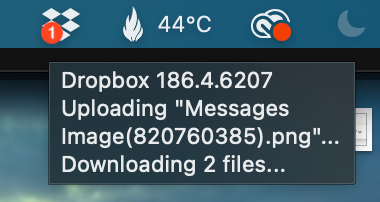
The "syncing" icon has been displayed on my Dropbox icon in my Mac system bar at the top of the screen for over a week now. Curious I looked at what it was trying to sync and it was a random file. I ...
- 2 years ago
Hey cloudstoragelover, sorry to jump in.
If you haven’t tried this recently, can you please unlink - relink your Dropbox app, and let me know if there’s a difference after that?

cloudstoragelover
2 years agoHelpful | Level 5
I have another PC synced to the same folder and no error on that one, which is a PC, so like you mine is on this machine only. It doesn't impact Dropbox's functionality thank goodness but annoying that it is stuck in a never-ending loop!

Nancy Dropbox Community Moderator
2 years agoDropbox Community ModeratorThanks for the info, cloudstoragelover!
If you’re still seeing the same file, when checking for syncing errors/the sync queue on your desktop app, please send me a screenshot of that as well, so that I can take a look.
smallbizHokkaido, sorry to hear the same thing happens for you.
Can you clarify the OS version of your device, and send me a screenshot of your desktop app’s syncing status and app version?
- cloudstoragelover2 years agoHelpful | Level 5
Nancy The "View sync issues" shows no problems. At the bottom of the pop-out menu from the system bar at the top of my Mac it says "syncing 3 files" but I have no actual files I'm trying to sync. Here's what I see (attached).
- smallbizHokkaido2 years agoNew member | Level 2
Same
- smallbizHokkaido2 years agoNew member | Level 2
The issue resolved itself. Dropbox is no longer searching for the deleted file and is "up to date".
Hope the same for you as well!
- Hannah2 years ago
Hey smallbizHokkaido, I'm happy your issue was resolved!
How about you, cloudstoragelover? Are you still having this issue?
If so, can you check this article with some troubleshooting steps you can follow, to see if they help?
- cloudstoragelover2 years agoHelpful | Level 5
Hannah I uninstalled the Dropbox app on my Mac, and reinstalled it. Same issue, shows a "1" icon and says it's still trying to upload the file I deleted.

About Create, Upload, and Share
Find help to solve issues with creating, uploading, and sharing files and folders with Dropbox.
The Dropbox Community team is active from Monday to Friday. We try to respond to you as soon as we can, usually within 2 hours.
If you need more help you can view your support options (expected response time for an email or ticket is 24 hours), or contact us on X, Facebook or Instagram.
For more info on available support options for your Dropbox plan, see this article.
If you found the answer to your question in this Community thread, please 'like' the post to say thanks and to let us know it was useful!


