We’re Still Here to Help (Even Over the Holidays!) - find out more here.
Forum Discussion

cloudstoragelover
3 years agoHelpful | Level 5
Dropbox is stuck on a file I deleted
The "syncing" icon has been displayed on my Dropbox icon in my Mac system bar at the top of the screen for over a week now. Curious I looked at what it was trying to sync and it was a random file. I ...
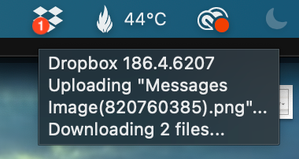
- 3 years ago
Hey cloudstoragelover, sorry to jump in.
If you haven’t tried this recently, can you please unlink - relink your Dropbox app, and let me know if there’s a difference after that?


Jay Dropbox Community Moderator
3 years agoDropbox Community ModeratorIs this file from the Messages app on your machine or iPhone by any chance? Do you still have a copy of it somewhere?

cloudstoragelover
3 years agoHelpful | Level 5
Jay I have no idea where the file originated from - when I first noticed this file was causing problems, I opened the Dropbox.com site and looked at ALL of my files. Using search I was able to find it, and it wasn't even an image, but a file missing an icon. I deleted it, permanently, from that location, thinking that would solve this issue.
Sadly it did not, as Dropbox has continued to look for it despite restarts, delete/install, etc..it just won't give up on it no matter what I do. The file no longer exists, anywhere.
- Walter3 years ago
Hey cloudstoragelover - sorry to jump in here, but could you try fixing your hardlinks and permissions as outlined here and let us know if the issue persists?
- cloudstoragelover3 years agoHelpful | Level 5
Thanks Walter I did both of those tasks, permissions and hard links, and nothing changed.
- Nancy3 years ago
Hey cloudstoragelover, sorry to jump in.
If you haven’t tried this recently, can you please unlink - relink your Dropbox app, and let me know if there’s a difference after that?
- cloudstoragelover3 years agoHelpful | Level 5
Omg Nancy That fixed it, thank you!!!
- Nancy3 years ago

About Create, upload, and share
Find help to solve issues with creating, uploading, and sharing files and folders in Dropbox. Get support and advice from the Dropbox Community.
The Dropbox Community team is active from Monday to Friday. We try to respond to you as soon as we can, usually within 2 hours.
If you need more help you can view your support options (expected response time for an email or ticket is 24 hours), or contact us on X, Facebook or Instagram.
For more info on available support options for your Dropbox plan, see this article.
If you found the answer to your question in this Community thread, please 'like' the post to say thanks and to let us know it was useful!


