Your workflow is unique 👨💻 - tell us how you use Dropbox here.
Forum Discussion

ilakn
2 months agoExplorer | Level 4
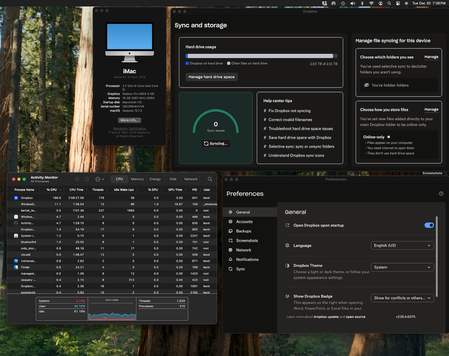
Dropbox is stuck syncing 60K files or 118GB and taking ~200% CPU
Device iMac 2019 27-inch Retina 5K Operating System/Browser (if using the web) Sequoia 15.7.2 Dropbox App Version (if using the app) v238.4.6075 Syncing Status "Syncing 60,850 files "
Questi...

ilakn
2 months agoExplorer | Level 4
Hi Megan - after a couple of days of keeping my computer unlocked with no screen saver or screen lock, the sync has stopped and everything seems to be up-to-date. I'm not sure what combination of what I did worked this time around vs the other times I tried to keep my computer running and waiting. But the issue resolved itself.
FYI I did set bandwidth settings of 150 KB/s for both upload and download. I do not have any proxy settings and set LAN Sync on. Also as mentioned I deleted and turned off backups on Dropbox.


About Create, Upload, and Share
Find help to solve issues with creating, uploading, and sharing files and folders with Dropbox.
The Dropbox Community team is active from Monday to Friday. We try to respond to you as soon as we can, usually within 2 hours.
If you need more help you can view your support options (expected response time for an email or ticket is 24 hours), or contact us on X, Facebook or Instagram.
For more info on available support options for your Dropbox plan, see this article.
If you found the answer to your question in this Community thread, please 'like' the post to say thanks and to let us know it was useful!


