Your workflow is unique 👨💻 - tell us how you use Dropbox here.
Forum Discussion

bauss
8 years agoExplorer | Level 4
Dropbox not syncing certain files
For the past few days, dropbox has not synced a few specific files on my mac. I get this when I check the status in menu bar I've cleared cache, fixed permissions, and run check disk...
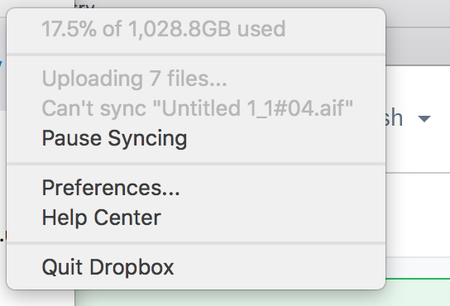
 7 years ago
Problem possibly solved, but I don't really know how. I logged out of dbox online then closed and opened dbox desktop. Then I dragged the master file (with it's sub-files) into the dbox folder. I got a message asking if I want to replace the file duplicates (which meant the files were in dbox online but I wasn't able to view them before). I answered, Skip. The sync closed, then I logged on to dbox online and all the files were there. Let's hope the issue doesn't re-occur. :)

Chris_J Super User alumni
8 years agoSuper User alumniThanks for reporting here, can you submit a Support Ticket?
There seems to be something the Dropbox team needs to see here.
Submit a ticket https://www.dropbox.com/support
Check or update Ticket via https://www.dropbox.com/support?ref=dropboxsupport
Please be patient and it will take some time and please include this Thread url as it contains useful info. And Good Luck

bauss
8 years agoExplorer | Level 4
Just did.. thanks!
 sweetsound20018 years agoExplorer | Level 4
Having the same exact issue, and all the files that won't sync came from Logic Studio X (High Sierra). The same exact files and folders synced just fine, without any errors whatsoever from my Sierra computer, so this is most definitely a High Sierra Dropbox app issue.
About Create, Upload, and Share
Find help to solve issues with creating, uploading, and sharing files and folders with Dropbox.
The Dropbox Community team is active from Monday to Friday. We try to respond to you as soon as we can, usually within 2 hours.
If you need more help you can view your support options (expected response time for an email or ticket is 24 hours), or contact us on X, Facebook or Instagram.
For more info on available support options for your Dropbox plan, see this article.
If you found the answer to your question in this Community thread, please 'like' the post to say thanks and to let us know it was useful!


