Need to see if your shared folder is taking up space on your dropbox 👨💻? Find out how to check here.
Forum Discussion

posixltd
2 years agoExplorer | Level 3
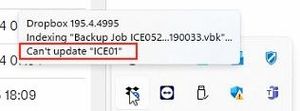
Error "Can't update <name>", what does it mean?
"ICE01" is the name of multiple files, multiple folders, and also a computer we long ago stopped backing up to Dropbox.
1. How do we know which one of those it's referring to?
2. W...

Jay Dropbox Community Moderator
2 years agoDropbox Community ModeratorHi posixltd, thanks for bringing this to our attention.
Since you have multiple files with the same name, it isn't possible to determine which one it is. You should be able to locate the file or folder by the blue syncing icons.
Is there a backup for that machine on this page?
This will help me to assist further!

posixltd
2 years agoExplorer | Level 3
Hi Jay,
Thank you for your prompt reply!
No, the machine does not appear on that page.
You say I should be able to "locate" the file/folder via the blue sync icon, but I can't find a way to search for it ("locate it"), so I assume you mean "identify it" when I locate it. That implies I must manually browse our entire Dropbox to locate either the blue syncing icon or the red failed icon. That would take a very long time.
Can you clarify if "can't update" refers to the remote file or the local file?
Thank you!
- Jay2 years ago
In general, that message would indicate something on the local machine that is trying to update and sync.
Are you not able to search for the file in Explorer with that name to see which icon it has?
About Create, upload, and share
Find help to solve issues with creating, uploading, and sharing files and folders in Dropbox. Get support and advice from the Dropbox Community.
The Dropbox Community team is active from Monday to Friday. We try to respond to you as soon as we can, usually within 2 hours.
If you need more help you can view your support options (expected response time for an email or ticket is 24 hours), or contact us on X, Facebook or Instagram.
For more info on available support options for your Dropbox plan, see this article.
If you found the answer to your question in this Community thread, please 'like' the post to say thanks and to let us know it was useful!


