Need to see if your shared folder is taking up space on your dropbox 👨💻? Find out how to check here.
Forum Discussion

posixltd
2 years agoExplorer | Level 3
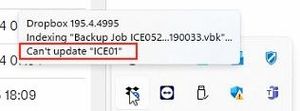
Error "Can't update <name>", what does it mean?
"ICE01" is the name of multiple files, multiple folders, and also a computer we long ago stopped backing up to Dropbox.
1. How do we know which one of those it's referring to?
2. W...

posixltd
2 years agoExplorer | Level 3
Hi Jay, the file by that exact name syncs correctly if I make it available Offline. The folder by that exact name is 4 GB. The alert is no longer visible, but that may be because there is a new, unrelated alert and the alert area only is big enough to show 1 alert. Is there a way to see older alerts?

Jay Dropbox Community Moderator
2 years agoDropbox Community ModeratorNo, currently it isn't possible to see older alerts on the desktop app. What message are you currently seeing in the desktop app?
- posixltd2 years agoExplorer | Level 3
Two different messages.
1. Mouseover shows:
Sync issues shows:
I understand both of those messages.
- Jay2 years ago
For the first file ending in vbk, most likely another app or service is keeping that file active, or writing to is constantly. Could you try quitting that app and seeing if it syncs normally?
The same should apply for the second file, it's likely open in another app, or in use somewhere.
- posixltd2 years agoExplorer | Level 3
Hi Jay,
As I said, I understand both of those messages. My concern is the original message which has now disappeared. If the latest message hides the older message, how do I know if the older issue is resolved ("Can't update ICE01")?
- Jay2 years ago
Since it isn't showing up, this could indicate that there is no longer an issue with that file or folder. If this does appear again in the future, please let me know.
- posixltd2 years agoExplorer | Level 3
Hi Jay,
"could indicate" is not reassuring. Does that imply Dropbox is inconsistent or unpredictable in its error messages?
- Walter2 years ago
Hey posixltd - sorry to jump in here.
I see where you're coming from and I appreciate sharing your thoughts on this with us. Since the issue no longer persists though, I'm afraid we can't drill further into it. However, if it resurfaces, please don't hesitate to let us know so that we can continue looking into it together.
- posixltd2 years agoExplorer | Level 3
Hi Walter, your colleague Jay said "it isn't possible to see older alerts on the desktop app". If you can't see older alerts, how do you know the issue no longer persists?
- posixltd2 years agoExplorer | Level 3
Hi Megan, your colleague Jay says "it isn't possible to see older alerts on the desktop app", which is consistent with my observations. You are implying new alerts will only appear after an old alert is fixed, which doesn't make sense. Hiding a previous alert doesn't mean it's fixed. It just means I can't see it.


About Create, upload, and share
Find help to solve issues with creating, uploading, and sharing files and folders in Dropbox. Get support and advice from the Dropbox Community.
The Dropbox Community team is active from Monday to Friday. We try to respond to you as soon as we can, usually within 2 hours.
If you need more help you can view your support options (expected response time for an email or ticket is 24 hours), or contact us on X, Facebook or Instagram.
For more info on available support options for your Dropbox plan, see this article.
If you found the answer to your question in this Community thread, please 'like' the post to say thanks and to let us know it was useful!


