Your workflow is unique 👨💻 - tell us how you use Dropbox here.
Forum Discussion

twopianohands
1 year agoExplorer | Level 3
File with a grey circle on my computer - how to get rid of it?
Hi!
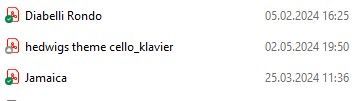
I never had any issues with Dropbox, all just went smooth. For a few weeks now I sometimes get a grey circle in front of a file that i want to put into the Dropbox. It's only when I move a file...
- 1 year ago
Hey twopianohands - thanks for posting on our Community and happy Friday!
This icon means that the file is online only. Could you try making it available offline and let me know how it goes?
Thanks so much!

Walter Dropbox Community Moderator
1 year agoDropbox Community ModeratorHey twopianohands - thanks for posting on our Community and happy Friday!
This icon means that the file is online only. Could you try making it available offline and let me know how it goes?
Thanks so much!
 twopianohands1 year agoExplorer | Level 3
it worked, I made it available offline and it has the green corcle now. but why do I have to do this? I never had to before and all the files got the green circle immediately.
- Walter1 year ago
Glad to hear that did the trick twopianohands
We recently introduced the option to make files online only to users on the Basic plan - perhaps this is why you only noticed this lately?
- twopianohands1 year agoExplorer | Level 3
Could be, ok! So that means that on my iPhone and iPad the files were already always only online, but on the Windows-Laptop they were automatically also offline. And that changed now and I have to deal the same way with the files on my laptop as I have before on the other devices. do I get that right?
Thanks a lot!
About Create, Upload, and Share
Find help to solve issues with creating, uploading, and sharing files and folders with Dropbox.
The Dropbox Community team is active from Monday to Friday. We try to respond to you as soon as we can, usually within 2 hours.
If you need more help you can view your support options (expected response time for an email or ticket is 24 hours), or contact us on X, Facebook or Instagram.
For more info on available support options for your Dropbox plan, see this article.
If you found the answer to your question in this Community thread, please 'like' the post to say thanks and to let us know it was useful!


