Your workflow is unique 👨💻 - tell us how you use Dropbox here.
Forum Discussion

Machzy
3 months agoNew member | Level 2
How do I get all my Camera Upload pictures to sync locally automatically?
I set my sync preferences to offline but Dropbox keeps downloading the pictures with 'Available when online' as the default:
Device: iPhone 15 Operating System/Browser (if using the web): Win...
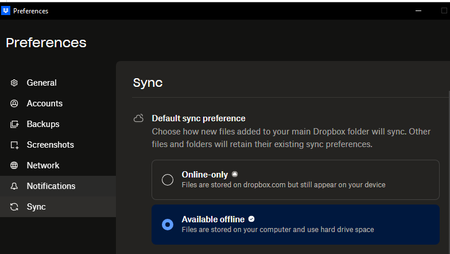
- 3 months ago
Hey Machzy, thanks for bringing this to our attention.
Does this only happen with camera uploads files? What about other files you add to your Dropbox account from other devices or from dropbox.com?
Does the Dropbox desktop app sync files as normal otherwise?
Are you missing any right-click options for files or folders in your local Dropbox folder?
Let me know and we'll go from there!


Machzy
3 months agoNew member | Level 2
Hi Hannah, here are my answers:
- It looks like it only happens with camera uploads. I just uploaded a PDF to my Dropbox and it was available offline immediately
- Desktop syncs files as normal
- Right-click options are not missing
Thanks to your comment, I right-clicked on my Camera Upload folder and changed it to 'Make available offline'. I should be good now. Thanks!

About Create, Upload, and Share
Find help to solve issues with creating, uploading, and sharing files and folders with Dropbox.
The Dropbox Community team is active from Monday to Friday. We try to respond to you as soon as we can, usually within 2 hours.
If you need more help you can view your support options (expected response time for an email or ticket is 24 hours), or contact us on X, Facebook or Instagram.
For more info on available support options for your Dropbox plan, see this article.
If you found the answer to your question in this Community thread, please 'like' the post to say thanks and to let us know it was useful!


