We're making some changes to the Dropbox Community 👩💻 - Find out more here.
Forum Discussion

raffishtenant
4 years agoHelpful | Level 6
How to disable Smart Sync, really and truly?
Hi all, I know I'm not the first to ask this—Dropbox users have apparently been having problems with it for years now—and maybe there's an answer somewhere in the forum that I simply haven't found...
- 4 years agoHi raffishtenant, let's see what we can find on this together.
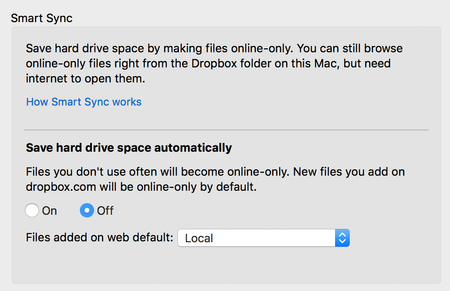
If you don't want to use Smart Sync, all you'd need to do is change your default sync options for new content to "local" and recall any files that are now "online only."
For details on syncing online-only material and selecting the default setting for new content, you can check this Help Center.
Would you like to give this a go, and let me know how it goes?
Thanks!


Rich Super User II
4 years agoSuper User II
Jonassis wrote:
the problem is, my version of the client does not offer the option to "Toggle Dropbox system extension to off."
The problem you're having is that the setting you're looking for is not part of the Dropbox client. As the article you linked mentioned, that setting is in your Account settings on the Dropbox website.
- Sign in to dropbox.com.
- Click your avatar (profile picture or initials) in the upper-right corner.
- Click Settings.
- Click the General tab.
- Toggle Dropbox system extension to off.

Jonassis
4 years agoHelpful | Level 5
There it was!
Thanks Rich Seems to be exactly what I needed. There is even an additional option there to "Disable Smart Sync update for Mac - With this update, online-only files will no longer appear to take up hard drive space.". Wish I had known about these "hidden" gems. Would have saved lots of frustration.
About Create, Upload, and Share
Find help to solve issues with creating, uploading, and sharing files and folders with Dropbox.
The Dropbox Community team is active from Monday to Friday. We try to respond to you as soon as we can, usually within 2 hours.
If you need more help you can view your support options (expected response time for an email or ticket is 24 hours), or contact us on X, Facebook or Instagram.
For more info on available support options for your Dropbox plan, see this article.
If you found the answer to your question in this Community thread, please 'like' the post to say thanks and to let us know it was useful!


