Our Community is in read-only mode until April 8th, learn more here. You can still search existing threads or get help via Dropbox Support, the Dropbox Help Center, or Learn.
Forum Discussion

Tejas
2 years agoExplorer | Level 3
How to Start a Retry
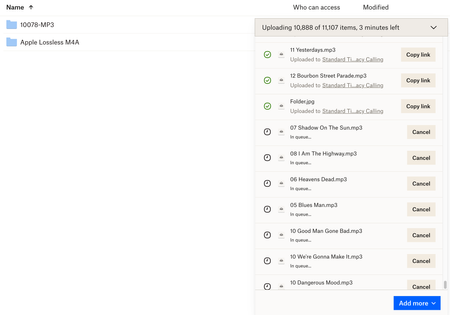
I have about 25 files with upload errors. I clicked "retry all" and they have all been added back "in queue" with a little clock icon next to each file. The only option appears to be the "Cancel" but...

Jay Dropbox Community Moderator
2 years agoDropbox Community ModeratorYes, as you've already chosen to retry all the uploads, it can't be cancelled to then only find the failed uploads to retry those ones.

Tejas
2 years agoExplorer | Level 3
Is there some way I should have known that? It appeared that I could retry each file individually, or attempt a "retry" on all of the failed uploads at once. That's obviously not how it works, but some clarity is called for here, I think.
About Create, Upload, and Share
Find help to solve issues with creating, uploading, and sharing files and folders with Dropbox.
The Dropbox Community team is active from Monday to Friday. We try to respond to you as soon as we can, usually within 2 hours.
If you need more help you can view your support options (expected response time for an email or ticket is 24 hours), or contact us on X, Facebook or Instagram.
For more info on available support options for your Dropbox plan, see this article.
If you found the answer to your question in this Community thread, please 'like' the post to say thanks and to let us know it was useful!


