Our Community is in read-only mode until April 8th, learn more here. You can still search existing threads or get help via Dropbox Support, the Dropbox Help Center, or Learn.
Forum Discussion

Mhmd Hakam
1 year agoExplorer | Level 3
I can't activate Dropbox Backup on my new Mac
Hi Team,
i have a company Dropbox account, on my old laptop i did put automatic backup for my desktop, so bascially everything i put on my desktop backs up directly which was very convenient, now i...
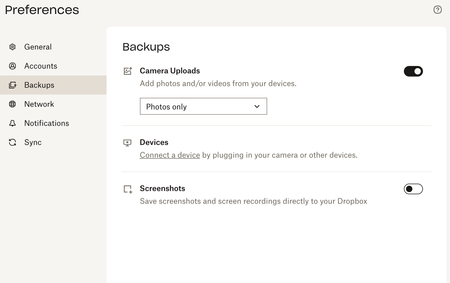
- 1 year ago
Hi again Mhmd Hakam, and sorry for any delays. I see you mentioned in the beginning that you’re part of a Business team.
Can you check with your team admin (in case you’re not one yourself), if they’ve disabled the Dropbox Backup feature for the whole team? Here’s how they can double check this on their end.

Mhmd Hakam
1 year agoExplorer | Level 3
no it is still the same, i did reboot the mac, i uninstalled Dropbox and downloaded again but still im not getting the option to automatically backup my desktop. any reasons why? what should i do? one more thing the status of the old mac on this page is showing "unlinked"

Nancy Dropbox Community Moderator
1 year agoDropbox Community ModeratorHi Mhmd Hakam! You mentioned above that you’re running this app version 198.3.7448. Please note that this is a beta app version, so I’d like you to do is switch to the stable one instead.
To do this, please go here and turn off “early releases”. After that, you can download the stable app version from this link.
- Mhmd Hakam1 year agoExplorer | Level 3
Thanks, should i un-install the previous one? if yes how can i do that? i only delete the app from the application folder or i should do something else?
Thanks,
- Mhmd Hakam1 year agoExplorer | Level 3
Hi Again, i did download version 197.4.7571 but im still not getting the Automatically backup option below screenshot for ref. i hope there is a solution for this as it is getting a bit frustrating
- Mhmd Hakam1 year agoExplorer | Level 3
Hi Team, any feedback on the below?
Thanks,
- Nancy1 year ago
Hi again Mhmd Hakam, and sorry for any delays. I see you mentioned in the beginning that you’re part of a Business team.
Can you check with your team admin (in case you’re not one yourself), if they’ve disabled the Dropbox Backup feature for the whole team? Here’s how they can double check this on their end.
About Create, Upload, and Share
Find help to solve issues with creating, uploading, and sharing files and folders with Dropbox.
The Dropbox Community team is active from Monday to Friday. We try to respond to you as soon as we can, usually within 2 hours.
If you need more help you can view your support options (expected response time for an email or ticket is 24 hours), or contact us on X, Facebook or Instagram.
For more info on available support options for your Dropbox plan, see this article.
If you found the answer to your question in this Community thread, please 'like' the post to say thanks and to let us know it was useful!


