Your workflow is unique 👨💻 - tell us how you use Dropbox here.
Forum Discussion

eludlow
1 month agoExplorer | Level 3
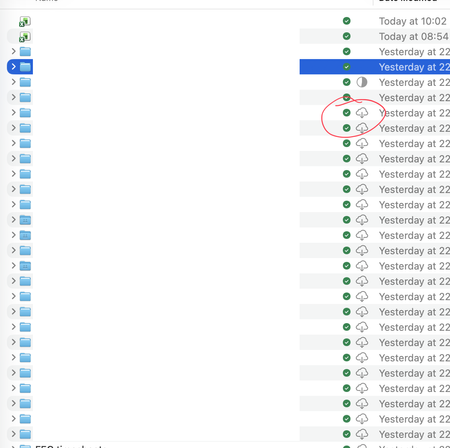
I can't make files available offline on Mac OS
Application Affected Dropbox Device Mac Studio Operating System/Browser (if using the web) macOS 26.2 (25C56) Dropbox App Version (if using the app)241.4.4795 Question or Issue Setting up a n...
- 1 month ago
Thanks for the info. If you're not on a Dropbox Basic plan with more than 3 devices connected, could you try an advanced reinstall of the app using the steps in this link?

Jay Dropbox Community Moderator
1 month agoDropbox Community ModeratorHi eludlow, thanks for messaging today!
When you say you tried to download en masse, do you mean by right clicking the Dropbox folder and choosing the Available offline option?
This will help me to assist further!
- Jay1 month ago
Thanks for the info. If you're not on a Dropbox Basic plan with more than 3 devices connected, could you try an advanced reinstall of the app using the steps in this link?
 eludlow1 month agoExplorer | Level 3
Thank you. Actioning that now. It's now syncing for the first time. Only once that's done will it be Abel to update to Dropbox on File Provider.
Will report back!
- eludlow1 month agoExplorer | Level 3
Hmm well I’ve done the reinstall as outlined. It then proceeded to sync, taking five hours. I then set to offline files and moved to the Apple File Provider, and the reindexing took five hours. Nothing showing as offline so I’ve right clicked the main Dropbox folder again and set “make available offline” (Dropbox menu item) and it’s syncing AGAIN (five hours estimated).
strong sense of Déjà vu!
About Create, Upload, and Share
Find help to solve issues with creating, uploading, and sharing files and folders with Dropbox.
The Dropbox Community team is active from Monday to Friday. We try to respond to you as soon as we can, usually within 2 hours.
If you need more help you can view your support options (expected response time for an email or ticket is 24 hours), or contact us on X, Facebook or Instagram.
For more info on available support options for your Dropbox plan, see this article.
If you found the answer to your question in this Community thread, please 'like' the post to say thanks and to let us know it was useful!


