Your workflow is unique 👨💻 - tell us how you use Dropbox here.
Forum Discussion

mellylouc
4 months agoNew member | Level 2
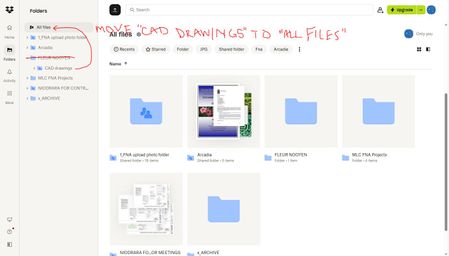
I can't move my shared folder under "All files".
Hello!
I'm OCD and decided to create a folder specifically for a client's projects. The problem is we use AutoCAD and XREF linking, which breaks the link/xref everytime a different team member open...
 4 months ago
Hi Megan,
Thanks for getting back to me so quickly! At first I didn't see an option in my "suggested folders", within the "move" menu to move back into the main pool/All Files. I then clicked on the root folder below and it worked! Thank you for your help, this solves so many issues for me!
All my best,
Melissa
mellylouc
4 months agoNew member | Level 2
Hi Megan,
Thanks for getting back to me so quickly! At first I didn't see an option in my "suggested folders", within the "move" menu to move back into the main pool/All Files. I then clicked on the root folder below and it worked! Thank you for your help, this solves so many issues for me!
All my best,
Melissa


About Create, upload, and share
Find help to solve issues with creating, uploading, and sharing files and folders in Dropbox. Get support and advice from the Dropbox Community.
The Dropbox Community team is active from Monday to Friday. We try to respond to you as soon as we can, usually within 2 hours.
If you need more help you can view your support options (expected response time for an email or ticket is 24 hours), or contact us on X, Facebook or Instagram.
For more info on available support options for your Dropbox plan, see this article.
If you found the answer to your question in this Community thread, please 'like' the post to say thanks and to let us know it was useful!


