We're making some changes to the Dropbox Community 👩💻 - Find out more here.
Forum Discussion

calmfrog
6 months agoNew member | Level 2
I see two sync icons next to my folders, even though there are no online-only files within.
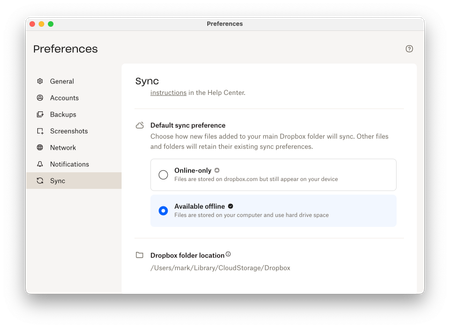
Hi, I just upgraded to Dropbox on File Provider which uses the native MacOS file sync APIs. I like my files stored locally, so I changed the Default Sync Preference to Available offline.
As thi...
 6 months ago
Right, logging out and back in again has done the trick 👍. For anyone else who encounters this, my steps were:
- Log out (Dropbox > Preferences > Accounts > Sign out)
- Restart laptop (prob not necessary)
- Log in (follow Dropbox prompts)
- Dropbox indexes everything. You can see the progress % in the Dropbox status panel (took an hour for 10GB). During this stage the folders have a cloud icon (without arrow).
- Dropbox syncs everything - progress shown in the Dropbox status panel (took ~20mins). When a folder's contents are fully synced the folder's cloud icon disappears and there's just the green tick left.
- Once all folders are synced, they all have green ticks and no cloud icon. Job done.
calmfrog
6 months agoNew member | Level 2
Hi Nancy,
Upgraded to the latest version (232.4.5926), same behaviour.
The folders in my original screenshot have a lot of sub-folders and files so I can't really screenshot them, and I don't think that really narrows down the problem. This issue is consistent across all my Dropbox folders!
Here's some more details though to help diagnose further.
- Empty folders that were migrated have the same problem - they show the online-only icon. So even if there are no files in a migrated folder, Dropbox thinks there are online-only files within.
- If you delete all the files within a migrated folder, it still shows the online-only icon (consistent with point 1 above).
- If you right-click a migrated folder (empty or full) and select Make available offline, nothing happens - it still shows the online-only icon.
- If you duplicate a migrated folder (empty or full) the newly created folder is correctly available-offline (no icon).
- If you delete (move to Trash) a migrated online-only folder you get this warning ('2013' is the folder name in this case) which is particularly worrying 😳:
Thanks.

Megan Dropbox Community Moderator
6 months agoDropbox Community ModeratorHey calmfrog, let me also jump in here!
You mentioned "migrated folders" in your latest reply. In order for us to be on the same page, would you mind clarifying what you mean by that?
For those folders with the two icons, could you try again with marking them as available offline or do you notice that nothing happens when you do?
I know this might sound trivial, but can you try signing out of the app and then back in?
About Create, Upload, and Share
Find help to solve issues with creating, uploading, and sharing files and folders with Dropbox.
The Dropbox Community team is active from Monday to Friday. We try to respond to you as soon as we can, usually within 2 hours.
If you need more help you can view your support options (expected response time for an email or ticket is 24 hours), or contact us on X, Facebook or Instagram.
For more info on available support options for your Dropbox plan, see this article.
If you found the answer to your question in this Community thread, please 'like' the post to say thanks and to let us know it was useful!


