We're making some changes to the Dropbox Community 👩💻 - Find out more here.
Forum Discussion

calmfrog
6 months agoNew member | Level 2
I see two sync icons next to my folders, even though there are no online-only files within.
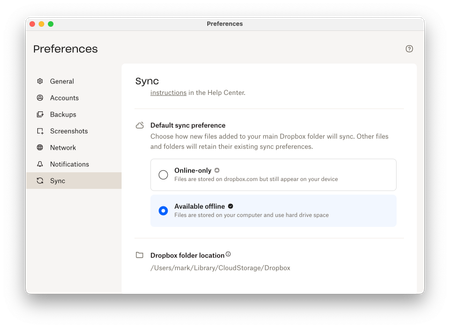
Hi, I just upgraded to Dropbox on File Provider which uses the native MacOS file sync APIs. I like my files stored locally, so I changed the Default Sync Preference to Available offline.
As thi...
 6 months ago
Right, logging out and back in again has done the trick 👍. For anyone else who encounters this, my steps were:
- Log out (Dropbox > Preferences > Accounts > Sign out)
- Restart laptop (prob not necessary)
- Log in (follow Dropbox prompts)
- Dropbox indexes everything. You can see the progress % in the Dropbox status panel (took an hour for 10GB). During this stage the folders have a cloud icon (without arrow).
- Dropbox syncs everything - progress shown in the Dropbox status panel (took ~20mins). When a folder's contents are fully synced the folder's cloud icon disappears and there's just the green tick left.
- Once all folders are synced, they all have green ticks and no cloud icon. Job done.
calmfrog
6 months agoNew member | Level 2
Right, logging out and back in again has done the trick 👍. For anyone else who encounters this, my steps were:
- Log out (Dropbox > Preferences > Accounts > Sign out)
- Restart laptop (prob not necessary)
- Log in (follow Dropbox prompts)
- Dropbox indexes everything. You can see the progress % in the Dropbox status panel (took an hour for 10GB). During this stage the folders have a cloud icon (without arrow).
- Dropbox syncs everything - progress shown in the Dropbox status panel (took ~20mins). When a folder's contents are fully synced the folder's cloud icon disappears and there's just the green tick left.
- Once all folders are synced, they all have green ticks and no cloud icon. Job done.
- Theresa6 months ago
Community Manager
Hi calmfrog and welcome to the Dropbox Community! I’m really glad to hear things are back to normal now and thank you for coming back to share your update. It’s always so helpful when people follow up, especially with sync icon issues like this ✨.
I’m Theresa 👩💻, one of the community managers here. Since you’re keeping such a close eye on how things sync, I’d love to know... do you have a favourite Dropbox feature that helps you stay organised or keeps your workflow smooth?
Looking forward to hearing more,
T 😺 (Dropbox Community Manager)


About Create, Upload, and Share
Find help to solve issues with creating, uploading, and sharing files and folders with Dropbox.
The Dropbox Community team is active from Monday to Friday. We try to respond to you as soon as we can, usually within 2 hours.
If you need more help you can view your support options (expected response time for an email or ticket is 24 hours), or contact us on X, Facebook or Instagram.
For more info on available support options for your Dropbox plan, see this article.
If you found the answer to your question in this Community thread, please 'like' the post to say thanks and to let us know it was useful!


