Your workflow is unique 👨💻 - tell us how you use Dropbox here.
Forum Discussion

MikeHenderson
2 years agoExplorer | Level 4
Large files will not download
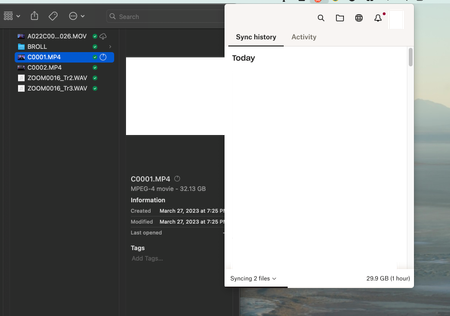
I'm having a recurring issue where large files will not download. It seems like 31gb is the max file size that dropbox will upload.
I select the folder to be available offline, files do not dow...

MikeHenderson
2 years agoExplorer | Level 4
MAc OS: 13.2.1
Dropbox: 170.4.5895
- Jay2 years ago
Dropbox Community Moderator
Hi MikeHenderson, thanks for bringing this to our attention.
Could you try right clicking the file and mark it as available offline to see if this helps?
Keep me updated with any progress!
- MikeHenderson2 years agoExplorer | Level 4
Yeah, I did that as stated in the original post.
I'm also getting the icons that are supposed to mean that the file is downloaded (green/white check mark) but the files are not here.
-M
- Megan2 years ago
Hi MikeHenderson, okay, let's try one more thing: can you right click on those specific files, and check if the context menu shows "make available offline" or "make online-only"?
Any screenshots are more than welcome!


About Create, Upload, and Share
Find help to solve issues with creating, uploading, and sharing files and folders with Dropbox.
The Dropbox Community team is active from Monday to Friday. We try to respond to you as soon as we can, usually within 2 hours.
If you need more help you can view your support options (expected response time for an email or ticket is 24 hours), or contact us on X, Facebook or Instagram.
For more info on available support options for your Dropbox plan, see this article.
If you found the answer to your question in this Community thread, please 'like' the post to say thanks and to let us know it was useful!


