We're making some changes to the Dropbox Community 👩💻 - Find out more here.
Forum Discussion

cgnerd
3 years agoHelpful | Level 6
Mac client continuously syncing with no file changes
For the past couple of weeks I've noticed that the Dropbox client is continuously syncing, even though there are no new files to sync. I can confirm that no files have been updated and need to be re-...

cgnerd
3 years agoHelpful | Level 6
I have way over 300k files (I'm an animator, rendering out image sequences means loads of files). The terminal command I used below includes online-only files, not sure how to count only offline files. Is 300k files some kind of limit for Dropbox in general, or is this just the Mac client? Do you know if this is something that will be improved/resolved?

Jay Dropbox Community Moderator
3 years agoDropbox Community ModeratorThe 300k file limit is a soft limit depending on the machine itself.
Are you able to use selective sync to prevent entire folders from syncing to the site to see if this helps?
- cgnerd3 years agoHelpful | Level 6
I've made all of the folders that I don't currently need 'online-only' and I've calculated the number of files in the offline folders (28,438), less than 10% of your soft limit. The issue is still occurring.
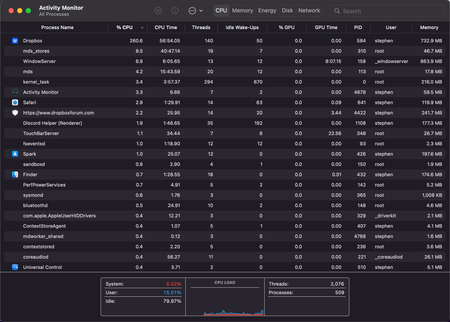
This is a screenshot of Dropbox not syncing, yet it's using up a whole core.
A couple of seconds later, it ramps up to 217%. Clicking on the Dropbox icon says it's syncing x number of files, but no changes have been made to the dropbox folder. There are no new files to sync. No new files are in the sync history either.
After a minute of this intense draw of power, it stops for a minute or so, then the process repeats again. I often have to pause Dropbox syncing if I'm having a video meeting as this excessive use of processing power makes the fans kick in.
- Hannah3 years ago
Sorry to jump in here, cgnerd.
The process of making a file online-only and selective sync are a bit different from each other.
Making a file online-only stops it from taking up space on your hard drive, but a placeholder file still remains in the folder.
With selective sync you can remove entire folders off of the Dropbox folder completely.
Can you try it, using the steps here, to see what happens?
- cgnerd3 years agoHelpful | Level 6
Hi Hannah, thanks for the reply and the clarification. I've used selective sync to remove most of the folders from Dropbox on my MBP, I'm left with 53,208 files:
I have given the Dropbox client time to chew through these changes and the icon is no longer regularly showing the sync symbol. I am finding that your client is still using a lot of power when there's nothing to do, but it's nowhere near as regular as before:
It's no longer regularly jumping up to and over 200%. Now, it's just a steady 100% for about 5 minutes every 20 minutes or so, which still causes the laptop to heat up and the fans to spin, just not as hot and loud as before.
As a comparison, I've been testing Nextcloud for file syncing. Maybe it isn't as smart as the Dropbox client and doesn't need to do background work when no new syncing is needed, but it never causes my computer to heat up and the fans to spin 😕
I think using selective sync to remove folders from your local Dropbox folder is a bit of an extreme step to take to reduce the load of your client, but it has made things slightly better so I'll mark your answer as correct. Thank you all for your help.

About Create, Upload, and Share
Find help to solve issues with creating, uploading, and sharing files and folders with Dropbox.
The Dropbox Community team is active from Monday to Friday. We try to respond to you as soon as we can, usually within 2 hours.
If you need more help you can view your support options (expected response time for an email or ticket is 24 hours), or contact us on X, Facebook or Instagram.
For more info on available support options for your Dropbox plan, see this article.
If you found the answer to your question in this Community thread, please 'like' the post to say thanks and to let us know it was useful!


