Your workflow is unique 👨💻 - tell us how you use Dropbox here.
Forum Discussion

cgnerd
3 years agoHelpful | Level 6
Mac client continuously syncing with no file changes
For the past couple of weeks I've noticed that the Dropbox client is continuously syncing, even though there are no new files to sync. I can confirm that no files have been updated and need to be re-...

TomBoo
3 years agoHelpful | Level 6
Hi!
Thanks for pointing out this issue, @cgnerd, and for the suggested workaround, @Hannah. However, I don't agree with closing this topic...
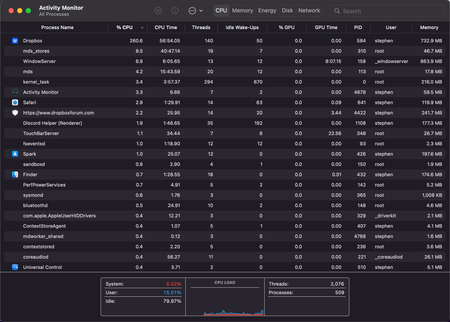
We're facing the same issues, both before and after upgrading to macOS 12.3. It's also causing Dropbox to be slow, and the dropdown-menu doesn't show the Dropbox features... so we can't use "Send with Transfer", "Copy Dropbox link", etc.
In our case, not being able to rely on SmartSync and having to switch off a number of folders through SelectiveSync, is very troublesome. F.e. as Executive Director of our architecture office, I need to be able to view and check all folders directly from the Finder, relying also on the Spotlight search capabilities. We're on Dropbox Business Advanced, paying a substantial amount of money, so we should be able to rely on Dropbox to work properly. If certain functionalities and services are offered, they should work fine. Moreover, these functionalities are some of the reasons why we opted for Dropbox instead of another application. If such functionalities are no longer working or will be discontinued in the future, we should be informed in due time, allowing us to reconsider our subscription.
This being said, I sincerely hope there is a proper solution coming very soon to resolve this issue.

IanJUSyd
3 years agoNew member | Level 2
I would like to add that I am experiencing exactly the same problems with dropbox too. I have a new MacBookPro, running MacOS 12.3.1. My subscription is via my institution and is a business package.
I use online-only storage options heavily to preserve hard drive space.
Constant background syncing yet no files are being synced in the activity menu, high impact on battery life, high impact on CPU performance.
When this occurs, the dropbox menu items in the right-click context menu do not appear, meaning I cannot pull online only files back onto the hard drive.
I frequently just turn off syncing to preserve battery life and then let it sync when the laptop is idle.
I am interested in seeing if a solution can be found to this as well.
About Create, Upload, and Share
Find help to solve issues with creating, uploading, and sharing files and folders with Dropbox.
The Dropbox Community team is active from Monday to Friday. We try to respond to you as soon as we can, usually within 2 hours.
If you need more help you can view your support options (expected response time for an email or ticket is 24 hours), or contact us on X, Facebook or Instagram.
For more info on available support options for your Dropbox plan, see this article.
If you found the answer to your question in this Community thread, please 'like' the post to say thanks and to let us know it was useful!


