Your workflow is unique 👨💻 - tell us how you use Dropbox here.
Forum Discussion

cgnerd
3 years agoHelpful | Level 6
Mac client continuously syncing with no file changes
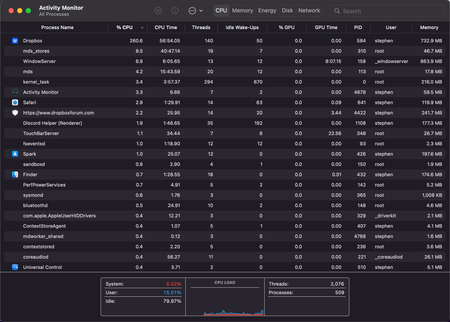
For the past couple of weeks I've noticed that the Dropbox client is continuously syncing, even though there are no new files to sync. I can confirm that no files have been updated and need to be re-...

TomBoo
3 years agoHelpful | Level 6
Dear Megan,
We reported the issue to Dropbox Support, as recommended by you.
Ticket #16986333.
Kinds regards,
Tom.

Megan Dropbox Community Moderator
3 years agoDropbox Community ModeratorHi TomBoo, I hope you're doing well!
Awesome! I just located the ticket and passed my comments there. Hold tight, and an agent will be with you shortly.
Thank you!
 cgnerd3 years agoHelpful | Level 6
I'm not sure if anyone else is noticing a difference lately, but I have. It's hard to tell if a software update has fixed things (as updates are installed in the background), or if it took a couple of days after removing most of my local folders for the client to settle down, but things are a lot better now, Dropbox idles around 1% or less most of the time. I could turn on a bulk of my folders again to see if things go back to where they were, but I'm a bit tied up right now. I'm using version 148.4.4519 of the client. If someone from Dropbox could confirm a software update has fixed the issue, I'll mark this thread with an accepted answer.
 IanJUSyd3 years agoNew member | Level 2
I've noticed this too. A big improvement.
About Create, Upload, and Share
Find help to solve issues with creating, uploading, and sharing files and folders with Dropbox.
The Dropbox Community team is active from Monday to Friday. We try to respond to you as soon as we can, usually within 2 hours.
If you need more help you can view your support options (expected response time for an email or ticket is 24 hours), or contact us on X, Facebook or Instagram.
For more info on available support options for your Dropbox plan, see this article.
If you found the answer to your question in this Community thread, please 'like' the post to say thanks and to let us know it was useful!


