Your workflow is unique 👨💻 - tell us how you use Dropbox here.
Forum Discussion

emilyk_SAS
5 months agoNew member | Level 2
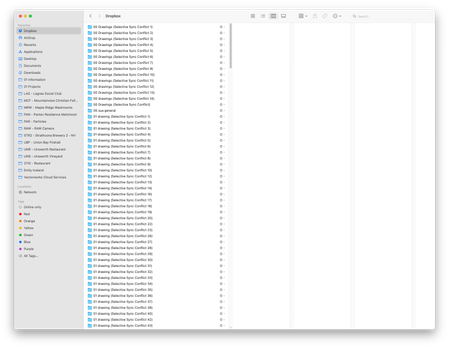
Multiple selective sync conflict folders after a hard drive repair
Device
iMac Retina 5k, 27 inch, 2019 Operating System/Browser (if using the web)
Sonoma 14.7.6 Dropbox App Version (if using the app)
v229.4.5197
Question or Issue
We are experien...

emilyk_SAS
5 months agoNew member | Level 2
Thank you for getting back to me Hannah.
We did not create any new folders. We uninstalled and reinstalled the dropbox app after the computer told us the dropbox app was corrupt. What is the proper way to do this so it doesnt automatically duplicate folders? Why did it create duplicate folders on its own?
- Hannah5 months ago
Dropbox Community Moderator
Not a problem, Emily!
Hmm, did you actually use selective sync to unsync the particular folders before?
And after reinstalling the Dropbox app, did you choose to sync all your folders to the Dropbox folder, including the ones that were previously unsynced?
- Nancy5 months ago
Hey emilyk_SAS! Did you get the chance to check out Hannah’s last reply?


About Create, Upload, and Share
Find help to solve issues with creating, uploading, and sharing files and folders with Dropbox.
The Dropbox Community team is active from Monday to Friday. We try to respond to you as soon as we can, usually within 2 hours.
If you need more help you can view your support options (expected response time for an email or ticket is 24 hours), or contact us on X, Facebook or Instagram.
For more info on available support options for your Dropbox plan, see this article.
If you found the answer to your question in this Community thread, please 'like' the post to say thanks and to let us know it was useful!


