Your workflow is unique 👨💻 - tell us how you use Dropbox here.
Forum Discussion

Louis L.7
1 month agoNew member | Level 2
My files aren't available offline, even though that's the default setting on my Mac Ventura.
Device
MacBook Pro 2022 M2 Operating System/Browser (if using the web)
Ventura 13.0.1 Dropbox App Version (if using the app)
240.4.8493
Syncing Status
Up to date
Question or Issu...
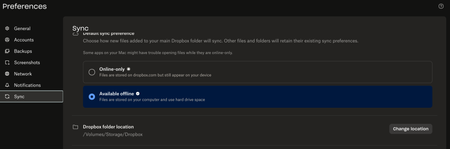
- 1 month ago
Hi Louis L.7! Thanks for your post.
If you right-click on your files, do you see an option to “make them available offline” instead?
If yes, can you select it and let me know if they’re synced to your device after that?
Otherwise, you can send me a screenshot of the options you see on your end.
Let me know how it goes.


Rich Super User II
1 month agoSuper User IILouis L.7 wrote:The available offline option is activated...
Keep in mind that the setting you're referring to doesn't apply to the files currently in your local Dropbox folder. It only applies to new files added from the Dropbox website or other devices. which need to sync down to your local folder.
As you've discovered, to change your existing files to available offline you need right-click on them and select Make available offline.
About Create, Upload, and Share
Find help to solve issues with creating, uploading, and sharing files and folders with Dropbox.
The Dropbox Community team is active from Monday to Friday. We try to respond to you as soon as we can, usually within 2 hours.
If you need more help you can view your support options (expected response time for an email or ticket is 24 hours), or contact us on X, Facebook or Instagram.
For more info on available support options for your Dropbox plan, see this article.
If you found the answer to your question in this Community thread, please 'like' the post to say thanks and to let us know it was useful!


