We’re Still Here to Help (Even Over the Holidays!) - find out more here.
Forum Discussion

wuermlfa
11 months agoNew member | Level 1
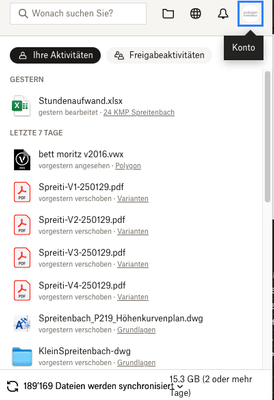
My macOS11.7.8 desktop app is stuck syncing 189k files.
Hi
I have two computers. One with new OSX works fine.
Laptop with OSX11.7.8 is snychronising some files, but mostly not, just stucked. If I change the folders to be synchronisied it won't change ...

Nancy Dropbox Community Moderator
11 months agoDropbox Community ModeratorThanks for posting this here on the forum, wuermlfa! Let’s have a look.
Since there’s a large number of files that are trying to sync, can you right-click on your local Dropbox folder and select the “Get info” option? I’d like a screenshot of the next window you’ll see to make sure there are no more than 300k files syncing locally (this can sometimes cause syncing/performance issues on the desktop app).
Did the syncing issue occur after a specific update, for example, or did something else happen right before it started?
Keep me posted and we’ll go from there.
About Create, upload, and share
Find help to solve issues with creating, uploading, and sharing files and folders in Dropbox. Get support and advice from the Dropbox Community.
The Dropbox Community team is active from Monday to Friday. We try to respond to you as soon as we can, usually within 2 hours.
If you need more help you can view your support options (expected response time for an email or ticket is 24 hours), or contact us on X, Facebook or Instagram.
For more info on available support options for your Dropbox plan, see this article.
If you found the answer to your question in this Community thread, please 'like' the post to say thanks and to let us know it was useful!


