Your workflow is unique 👨💻 - tell us how you use Dropbox here.
Forum Discussion

FrankRizzo
1 month agoNew member | Level 2
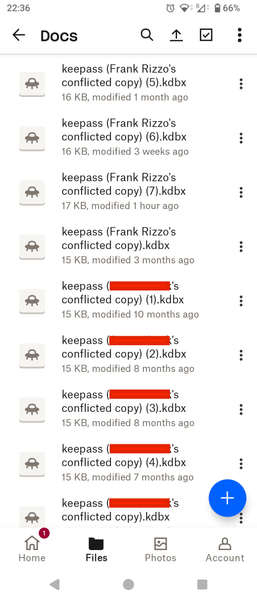
Mystery conflicted copies of a KeyPass file shared between phone and MacBook
Hello, I manage my passwords using the KeyPass app which stores them in a file I keep on DropBox to share between my Android phone and my MacBook. I use KeyPassDroid on my phone and KeyPassXC on my ...

Mark Super User II
1 month agoSuper User IIFrankRizzo wrote:I can't see whether the Mac is updating anything. Is there any way to see in DropBox which device made which change?
If you click on the file and try a 'restore previous versions' on the menu that should show you.
FrankRizzo wrote:Also I can't work out why some edits have my user name against them while others have my actual name.
One from computer and one from Mobile device?

FrankRizzo
1 month agoNew member | Level 2
One from computer and one from Mobile device?
That's what I assumed but the file history shows that they were all created by my user name on my mobile device, regardless of which name is shown in the filename so it looks like my MacBook is not the issue.
- Nancy1 month ago
Dropbox Community Moderator
Thanks for all the info you’ve provided so far!
I recommend reaching out to the KeePass support team next, FrankRizzo; they’ll need to have a look into this and check why those conflicted copies are being generated in the first place.

About Create, Upload, and Share
Find help to solve issues with creating, uploading, and sharing files and folders with Dropbox.
The Dropbox Community team is active from Monday to Friday. We try to respond to you as soon as we can, usually within 2 hours.
If you need more help you can view your support options (expected response time for an email or ticket is 24 hours), or contact us on X, Facebook or Instagram.
For more info on available support options for your Dropbox plan, see this article.
If you found the answer to your question in this Community thread, please 'like' the post to say thanks and to let us know it was useful!


