Your workflow is unique 👨💻 - tell us how you use Dropbox here.
Forum Discussion

jhedleyj
3 years agoHelpful | Level 7
Never-ending Backup in Dropbox Backup
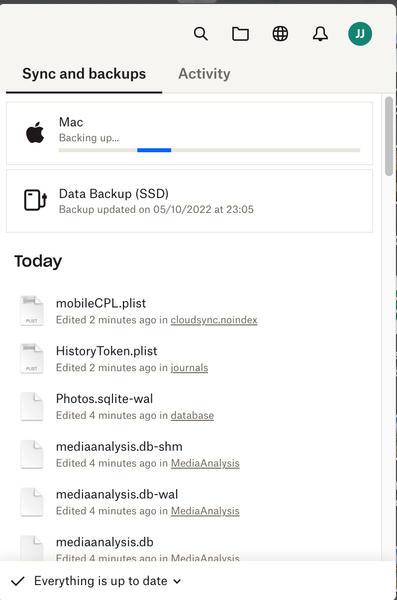
For a couple of weeks now I have noticed this phenomenon... When I opened the Dropbox Menu icon on my iMac I noticed that the Mac was backing up yet "Everything is up to date". I have checked in Fin...
- 3 years ago
Hi Megan
Good news!
I deleted version 159.3.5865 and downloaded/installed version 158.4.4564 and all is now well.
Many thanks for the help from you and your team.
John
jhedleyj
3 years agoHelpful | Level 7
Hi, Jay
I have checked through my most recently used files and can find nothing unusual. I have checked through the files I have backed up and all of them have the green tick next to them. I have also closed all my apps except for Safari and stopped my Time Machine backups. No change.
Curiously, The folders I backup from my Mac are exactly those that I have stored on my external SSD but they back up at different times. The SSD backup takes place in the early hours when the Mac is not being used at all. I shall unplug the Time Machine drives and my SSD to see if that does anything.

Megan Dropbox Community Moderator
3 years agoDropbox Community ModeratorHey jhedleyj, while you're at it, you might also want to leave the Beta testing and after that install the stable version of the app.
I'll be waiting for your updates.
- jhedleyj3 years agoHelpful | Level 7
Hi Megan
Good news!
I deleted version 159.3.5865 and downloaded/installed version 158.4.4564 and all is now well.
Many thanks for the help from you and your team.
John
- Megan3 years ago
 dwelcher2 years agoNew member | Level 2
I have the same issue. I started the Backup of my external drive two weeks ago, and it says it's finished----but the icon never reverts to the "ready" image. I'm using version 176.4.5108, which I think is the most current version.
- jhedleyj3 years agoHelpful | Level 7
It's happening again! I downloaded 158.4.4564 as advised and everything has been fine - up until today. The dropdown from Menu icon says " Everything is up to date" but at the same time the Mac is constantly backing up. I notice that the version now installed is 159.4.5870 (which I did NOT install!) Does it automatically update? If so can I have my self-installed version back, please?
- Walter3 years ago
Hey jhedleyj, sorry to hear you're having issues with this again.
Could you send us a screenshot of the app's exact status so that we can have a visual too?
As for the desktop app's update to the most recent version, yes, this happens automatically and can't be disabled at this time.

About Create, Upload, and Share
Find help to solve issues with creating, uploading, and sharing files and folders with Dropbox.
The Dropbox Community team is active from Monday to Friday. We try to respond to you as soon as we can, usually within 2 hours.
If you need more help you can view your support options (expected response time for an email or ticket is 24 hours), or contact us on X, Facebook or Instagram.
For more info on available support options for your Dropbox plan, see this article.
If you found the answer to your question in this Community thread, please 'like' the post to say thanks and to let us know it was useful!


