Our Community is in read-only mode until April 8th, learn more here. You can still search existing threads or get help via Dropbox Support, the Dropbox Help Center, or Learn.
Forum Discussion

annaneedshelp
2 years agoHelpful | Level 6
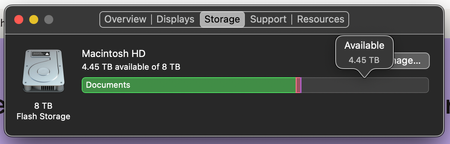
"Not enough free disk space" But I have 4TB available on my Mac.
Hello!! I'm using Dropbox for work, and for the last few months I've been trying to download multiple video files we have in our Dropbox to be available offline, however, Dropbox is constantly tellin...
 2 years ago
Hi all!
So after complaining to my IT about the problem, they did a huge sweep of the laptop and they fixed it! I'm not sure what they did, but I downloaded 200GB of video footage this morning with no issue.Thank you all for being so patient with me over the last few days, and I'm sorry for not being able to explain exactly what fixed it!

Walter Dropbox Community Moderator
2 years agoDropbox Community ModeratorHi there annaneedshelp - sorry to jump in too, but could you let us know your device's OS version and if you've reached out to our support team for further assistance since you first noticed this issue?
Also, where is your Dropbox folder located per the app's preferences under the sync tab?
annaneedshelp
2 years agoHelpful | Level 6
Welcome, Walter!
My device is a Macbook Pro 2021 running OS X Monterey Version 12.6 (we are not allowed to upgrade the system yet due to other application requirements).
And no I haven't reached out anywhere other than here.
And looks like my Dropbox folder is located in my user's home folder. I haven't changed this so this must be default or what the company allocated when they set it up.
- Hannah2 years ago
Hi again, Anna!
Just to make sure we've covered this base too, can you also check to see if Dropbox has full disk access on the computer?
You can find the steps here.
- annaneedshelp2 years agoHelpful | Level 6
Hannah, you're back! Haha and yup, it has full access! I thought it was that at first too. So I took away full access, restarted and then gave full access back and restarted, but still same issue.
- Jay2 years ago
Hi annaneedshelp, could you attach a screenshot showing where you're seeing this error message?


About Create, Upload, and Share
Find help to solve issues with creating, uploading, and sharing files and folders with Dropbox.
The Dropbox Community team is active from Monday to Friday. We try to respond to you as soon as we can, usually within 2 hours.
If you need more help you can view your support options (expected response time for an email or ticket is 24 hours), or contact us on X, Facebook or Instagram.
For more info on available support options for your Dropbox plan, see this article.
If you found the answer to your question in this Community thread, please 'like' the post to say thanks and to let us know it was useful!


