Your workflow is unique 👨💻 - tell us how you use Dropbox here.
Forum Discussion

skepticalthinker
2 years agoHelpful | Level 6
Shared link asks viewers to request access. Why does this happen?
Greetings. I have a shared file set to be viewable by anyone with the link, and I've sent the link to those I want to view the file (see screenshot). However, when they access the link, Dropbox sta...
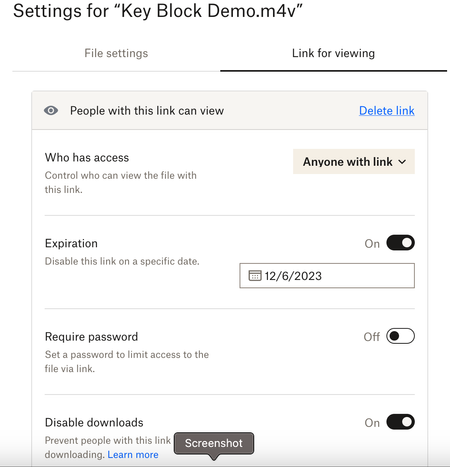
 2 years ago
Hi skepticalthinker ,
Jumping in here as a Product Manager for Dropbox Sharing to help out Hannah. Reading through your thread, this is very strange indeed. You've done everything right and I appreciate your patience in working through what is no doubt a frustrating experience. The best I can suggest here is to contact support for help. They'll be able to go through your specific situation and troubleshoot your specific link. Sharing a View Link with access set to "Anyone" should allow anyone - signed in or not - to access a web based preview of your content, and then from there to take further collaborative action like downloading, asking to join the content, etc.
Jason

Hannah Dropbox Community Moderator
1 year agoDropbox Community ModeratorHey Bm22782, sorry to hear about this.
Are you on a Dropbox team or an individual account?
If you have a Dropbox team, are the people that have this issue members of your team, external users or both?

Bm22782
1 year agoExplorer | Level 3
We are a Dropbox team and we all have had this issue. I have been told it's a problem on Dropbox's end.
About Create, Upload, and Share
Find help to solve issues with creating, uploading, and sharing files and folders with Dropbox.
The Dropbox Community team is active from Monday to Friday. We try to respond to you as soon as we can, usually within 2 hours.
If you need more help you can view your support options (expected response time for an email or ticket is 24 hours), or contact us on X, Facebook or Instagram.
For more info on available support options for your Dropbox plan, see this article.
If you found the answer to your question in this Community thread, please 'like' the post to say thanks and to let us know it was useful!


