Your workflow is unique 👨💻 - tell us how you use Dropbox here.
Forum Discussion

skepticalthinker
2 years agoHelpful | Level 6
Shared link asks viewers to request access. Why does this happen?
Greetings. I have a shared file set to be viewable by anyone with the link, and I've sent the link to those I want to view the file (see screenshot). However, when they access the link, Dropbox sta...
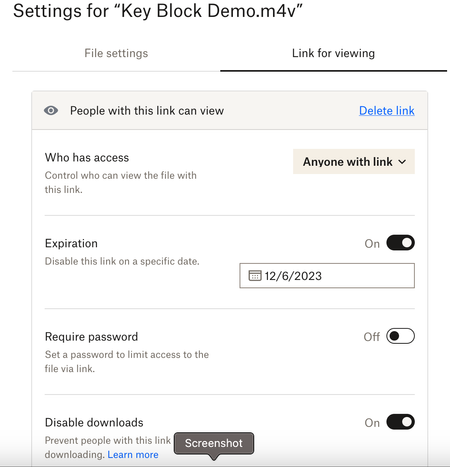
 2 years ago
Hi skepticalthinker ,
Jumping in here as a Product Manager for Dropbox Sharing to help out Hannah. Reading through your thread, this is very strange indeed. You've done everything right and I appreciate your patience in working through what is no doubt a frustrating experience. The best I can suggest here is to contact support for help. They'll be able to go through your specific situation and troubleshoot your specific link. Sharing a View Link with access set to "Anyone" should allow anyone - signed in or not - to access a web based preview of your content, and then from there to take further collaborative action like downloading, asking to join the content, etc.
Jason

christy21
11 months agoNew member | Level 2
HannahI have the same exact issue, and it is beyond frustrating. I am a graphic designer and sell png files, I have hundreds of links that I send to customers and they simply need to be able to download the files without logging in or asking permission.
My links are all set to anyone with the link can view with view only permission. I've tested them in the incognito browser and they work fine on my end. But just recently several customers are having problems and the links are not working and they are required to ask permission to view the files. Here's what my customer sent me:
"It's weird, bc I clicked the link in the updated doc you had sent to me, and it took me right to the correct file. But I got out of it and when I tried to go back into it, I got the pop up notification that I needed to request access. Then it wouldn't let me view the file."
Can you please help me figure this out? the thought of changing hundreds of links or moving to a new platform is overwhelming but I need Dropbox to work like it should and receive the functionality I pay for!

Megan Dropbox Community Moderator
11 months agoDropbox Community ModeratorHey christy21, thanks for posting here today!
The fact that it works when you view the link using an incognito mode, or that it initially works for them but then it stops makes me thing this might be a browser issue.
Have they tried accessing the link using an entirely different browser, or an incognito tab on their end?
If you could gather some screenshots of what your customers see would be most helpful.
Keep me posted, and we'll take it from there.
About Create, Upload, and Share
Find help to solve issues with creating, uploading, and sharing files and folders with Dropbox.
The Dropbox Community team is active from Monday to Friday. We try to respond to you as soon as we can, usually within 2 hours.
If you need more help you can view your support options (expected response time for an email or ticket is 24 hours), or contact us on X, Facebook or Instagram.
For more info on available support options for your Dropbox plan, see this article.
If you found the answer to your question in this Community thread, please 'like' the post to say thanks and to let us know it was useful!


