Our Community is in read-only mode until April 8th, learn more here. You can still search existing threads or get help via Dropbox Support, the Dropbox Help Center, or Learn.
Forum Discussion

stubb
5 years agoNew member | Level 2
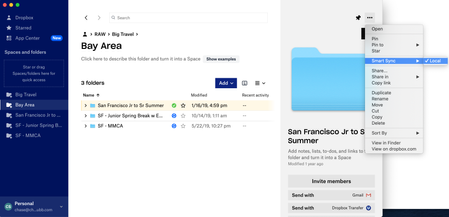
Smart Sync "online only" option doesn't show up in the menu (but local does).
As you can see, there is no option for "online only" here. I have gone into "preferences" and enabled smart sync (which required going into system preferences to give it permission). That's all squar...
 5 years ago
Working now!
Just took a little time and a simple restart.
Thanks.
Moderator note: Feel free to also have a look at this most recent thread: https://www.dropboxforum.com/t5/Create-upload-and-share/I-don-t-see-the-online-only-option/td-p/645719

Kvothe63
5 years agoNew member | Level 2
I have exactly the same problem, but just that the restart didn't solve the problem. Anybody out there ot help?

Jay Dropbox Community Moderator
5 years agoDropbox Community ModeratorHi Kvothe63, have you installed the Dropbox desktop application with admin permissions? If not, this could be why you're not seeing that option.
Could you try following these steps to install it and let me know how it goes.
- Kvothe635 years agoNew member | Level 2
Hi Jay,
thx for the hint. I found a different solution. First I went to the Dropbox settings, where I found a message that SystemSW update is blocked, clicking on the message I was led to the Mac OS security settings, where I had to enable the download of dropbox system SW. After re-starting it worked fine. But thank you for your help. This brought me to the solution I just implemented.
About Create, Upload, and Share
Find help to solve issues with creating, uploading, and sharing files and folders with Dropbox.
The Dropbox Community team is active from Monday to Friday. We try to respond to you as soon as we can, usually within 2 hours.
If you need more help you can view your support options (expected response time for an email or ticket is 24 hours), or contact us on X, Facebook or Instagram.
For more info on available support options for your Dropbox plan, see this article.
If you found the answer to your question in this Community thread, please 'like' the post to say thanks and to let us know it was useful!


