Your workflow is unique 👨💻 - tell us how you use Dropbox here.
Forum Discussion

langzi
2 years agoExplorer | Level 4
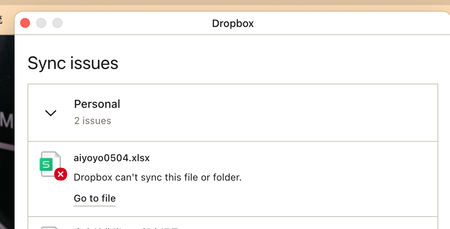
sync issues - restart will solve but any other way?
I have issues with sync, but if I restart my macbook, all the files will be synced. How should I solve this problem without restarting my macbook many times a day?

Jay Dropbox Community Moderator
2 years agoDropbox Community ModeratorHI langzi, are you still experiencing this issue on your device?

langzi
2 years agoExplorer | Level 4
Hi yes,
No solutions yet.
- Jay2 years ago
Thanks, in order to look into this matter in more detail, would it be possible to reach out to the email associated with your forum profile?
- langzi2 years agoExplorer | Level 4
HI YES PLEASE
 rastrodave2 years agoExplorer | Level 3
I am experiencing this same issue - Is there a solution yet
- Megan2 years ago
Hi rastrodave, welcome to our Community!
Can you clarify the OS you're currently on, along with the version of the Dropbox app that you have installed?
Have you tried any troubleshooting steps on your end? Just asking, to make sure we're on the same page here.
Let me know more!
- rastrodave2 years agoExplorer | Level 3
Ventura 13.4.1 / I dont know the version - I use drop box as a folder
I set the permissions as indicated / rebooted
I have been using dropbox for 10+ years with no issues til now
When I reboot - files do sync
Is there a fix
- Megan2 years ago
Hi rastrodave, I would like for you to locate your Dropbox icon on the menu, next to your WiFi and hover your mouse there and let me know the version, and syncing status, please.
- rastrodave2 years agoExplorer | Level 3
v179.4.4985
- Hannah2 years ago
Thanks for this info, rastrodave.
Since there's a new version of the Dropbox application that just came out, can you update to that, and see if that resolves your issue?
- rastrodave2 years agoExplorer | Level 3
Installed the new version - still will only sync with a restart
- Hannah2 years ago
In that case, can we send you an email, so we can investigate this further?
- rastrodave2 years agoExplorer | Level 3
yes
- Hannah2 years ago
Great, I just emailed you, Dave, so we'll continue there!
- langzi2 years agoExplorer | Level 4
Hi yes, I did but nothing changed. I deleted dropbox and wps, and reinstalled both, still same issue. Ben didn't reply my email since Aug.
- langzi2 years agoExplorer | Level 4
Hi I emailed 3 times but no replies.
- Jay2 years ago
If you're not receiving a reply, have you tried to send a new support ticket on the Dropbox site directly when logged into your account?
- langzi2 years agoExplorer | Level 4
Hi yes, still no reply and closed my tickets, could you please let someone contact me with a solution?
- langzi1 year agoExplorer | Level 4
Have you solved your sync problem?


About Create, Upload, and Share
Find help to solve issues with creating, uploading, and sharing files and folders with Dropbox.
The Dropbox Community team is active from Monday to Friday. We try to respond to you as soon as we can, usually within 2 hours.
If you need more help you can view your support options (expected response time for an email or ticket is 24 hours), or contact us on X, Facebook or Instagram.
For more info on available support options for your Dropbox plan, see this article.
If you found the answer to your question in this Community thread, please 'like' the post to say thanks and to let us know it was useful!


