We’re Still Here to Help (Even Over the Holidays!) - find out more here.
Forum Discussion

bugsinthecar
3 years agoExplorer | Level 3
Syncing from some folders, Backup from others
Hi there,
Like this user, I have C:\ and D:\ drives on my local machine.
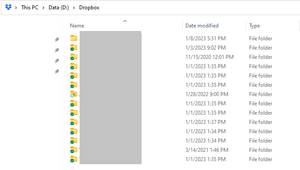
All the content I want to store in Dropbox is on the D:\ drive, and that's where my live-syncing Dropbox folder is...
- 3 years ago
Hi bugsinthecar, currently, there isn't any information on if this would change in the future. There isn't any official workaround to make it see the D drive either to add folders from there.


Hannah Dropbox Community Moderator
3 years agoDropbox Community ModeratorHey bugsinthecar, thanks for posting your query!
The Dropbox backup feature can currently only backup your system created folders (desktop, documents, downloads, etc.).
Manually created folders in the D drive cannot be backed up.
You'd have to manually move them into your Dropbox folder, to sync them.
I hope this clarifies things, but let me know if you have any questions.
 bugsinthecar3 years agoExplorer | Level 3
Hi Hannah, thanks for the quick and clear response!
My system did create the D:\ structure, actually, seemingly as part of Windows default installation on my machine.
It seems like a strange product choice that Dropbox Backup can work only with certain drive partitions...it's a product intended for users who might want to restore all their content, yes?
Are there plans to change this? Or do you have a suggested workaround so that I could use Dropbox Backup? With Amazon deprecating their Backup product this year, it seems likely that there'll be a lot of users shopping for a replacement (including me!).
- bugsinthecar3 years agoExplorer | Level 3
Hannah Any thoughts? (Sorry I didn't @ you last time!)
- Jay3 years ago
Hi bugsinthecar, currently, there isn't any information on if this would change in the future. There isn't any official workaround to make it see the D drive either to add folders from there.
About Create, upload, and share
Find help to solve issues with creating, uploading, and sharing files and folders in Dropbox. Get support and advice from the Dropbox Community.
The Dropbox Community team is active from Monday to Friday. We try to respond to you as soon as we can, usually within 2 hours.
If you need more help you can view your support options (expected response time for an email or ticket is 24 hours), or contact us on X, Facebook or Instagram.
For more info on available support options for your Dropbox plan, see this article.
If you found the answer to your question in this Community thread, please 'like' the post to say thanks and to let us know it was useful!


