We’re Still Here to Help (Even Over the Holidays!) - find out more here.
Forum Discussion

bugsinthecar
3 years agoExplorer | Level 3
Syncing from some folders, Backup from others
Hi there,
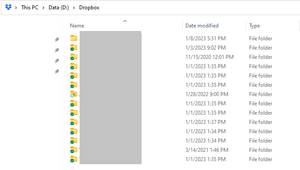
Like this user, I have C:\ and D:\ drives on my local machine.
All the content I want to store in Dropbox is on the D:\ drive, and that's where my live-syncing Dropbox folder is...
- 3 years ago
Hi bugsinthecar, currently, there isn't any information on if this would change in the future. There isn't any official workaround to make it see the D drive either to add folders from there.

Jay Dropbox Community Moderator
3 years agoDropbox Community ModeratorHi bugsinthecar, currently, there isn't any information on if this would change in the future. There isn't any official workaround to make it see the D drive either to add folders from there.

JoeyJoeJoe
3 years agoNew member | Level 2
Pretty weak.
I have TB of data and years of work in 'C:\workspace' and 'D:\' drive that I would like to back up to Dropbox. I am positive I can do this with Google Drive no problem. I'm already paying for a 2TB plan on Dropbox and would rather not have to migrate everything already in Dropbox over to Drive.
But it sounds like that's the solution here though, unfortunately.
About Create, upload, and share
Find help to solve issues with creating, uploading, and sharing files and folders in Dropbox. Get support and advice from the Dropbox Community.
The Dropbox Community team is active from Monday to Friday. We try to respond to you as soon as we can, usually within 2 hours.
If you need more help you can view your support options (expected response time for an email or ticket is 24 hours), or contact us on X, Facebook or Instagram.
For more info on available support options for your Dropbox plan, see this article.
If you found the answer to your question in this Community thread, please 'like' the post to say thanks and to let us know it was useful!


