Your workflow is unique 👨💻 - tell us how you use Dropbox here.
Forum Discussion

MelindaBuffet
3 years agoExplorer | Level 3
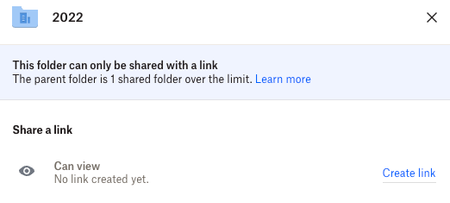
Team Sharing shared folder limit reached
Hi there,
We have a Dropbox Business Standard Account and our team consistently share folders within our Dropbox with external clients with no issues, but for the past week when we go to share,...

Jay Dropbox Community Moderator
3 years agoDropbox Community ModeratorHi MelindaBuffet, thanks for bringing this to our attention.
It sounds like you've reach the shared folder limit for that folder.
Do you get this error with any other shared folders on your account?
This will help me to assist further!

MelindaBuffet
3 years agoExplorer | Level 3
Thanks for getting back to me! I assumed that was the case however I've deleted over 50 folders hoping it would remove the message but it doesn't seem to have helped at all..
We have shared access by our whole team to every folder and then share links to external clients for their specific folders - I can't see where to manage those who have this link though if there being too many external people with shared links is the problem?
We're getting the error message on every folder we try to share on every level.
I'm a Dropbox novice so might be missing something very obvious, but every forum I've seen listing the issue just mentions deleting folders which I've been doing to no avail..
Appreciate the help!
- Hannah3 years ago
Hey MelindaBuffet, sorry to jump in here!
You mentioned that you have deleted 50 folders, would that be shared folders or non-shared ones?
Can you try unsharing a couple of shared folders, to see if that helps?

About Create, Upload, and Share
Find help to solve issues with creating, uploading, and sharing files and folders with Dropbox.
The Dropbox Community team is active from Monday to Friday. We try to respond to you as soon as we can, usually within 2 hours.
If you need more help you can view your support options (expected response time for an email or ticket is 24 hours), or contact us on X, Facebook or Instagram.
For more info on available support options for your Dropbox plan, see this article.
If you found the answer to your question in this Community thread, please 'like' the post to say thanks and to let us know it was useful!


