We’re Still Here to Help (Even Over the Holidays!) - find out more here.
Forum Discussion

bradimperialmetric
8 months agoNew member | Level 2
The app on my new MacBook will sync for 30 seconds, and then gets stuck.
I've installed DropBox desktop on a new MacBook Pro with no firewall installed
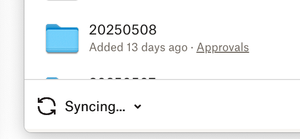
It will sync for 30 seconds, then get stuck on the Syncing... screen
when i pause and resume syncing it syncs f...

jacky786
8 months agoExplorer | Level 3
Exactly the same bro!
- Megan8 months ago
Dropbox Community Moderator
Hey jacky786, thanks for posting here!
How long has this been an issue for you?
Would you mind clarifying your OS, along with the Dropbox version you're using on your device? You can find this by hovering your mouse over the little Dropbox icon on your menu bar, next to your WiFi.
Keep me posted, and we'll take it from there!

About Create, upload, and share
Find help to solve issues with creating, uploading, and sharing files and folders in Dropbox. Get support and advice from the Dropbox Community.
The Dropbox Community team is active from Monday to Friday. We try to respond to you as soon as we can, usually within 2 hours.
If you need more help you can view your support options (expected response time for an email or ticket is 24 hours), or contact us on X, Facebook or Instagram.
For more info on available support options for your Dropbox plan, see this article.
If you found the answer to your question in this Community thread, please 'like' the post to say thanks and to let us know it was useful!


