We're making some changes to the Dropbox Community 👩💻 - Find out more here.
Forum Discussion

ltoribara
1 month agoExplorer | Level 3
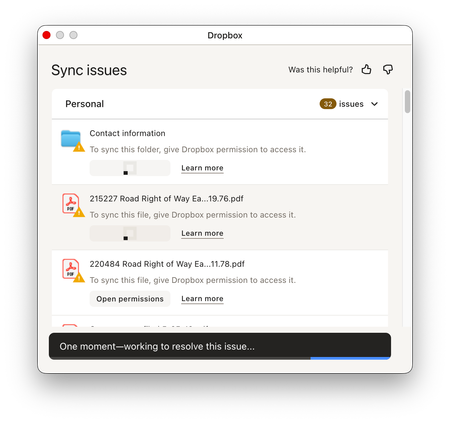
The Dropbox desktop app on Mac keeps giving an error that 32 files are unable to sync
Dropbox Plan
Plus Are you a Team Member or Admin?
Admin Do you have access to the email linked to the account?
Yes Are there any devices connected to your Dropbox account?
Laptop O...

Walter Dropbox Community Moderator
1 month agoDropbox Community ModeratorHey ltoribara - sorry to hear about this.
Can you temporarily disable your antivirus program and let us know if there's any progress?
If not, you can try logging out of your account through the app's preferences and then back in, after rebooting your computer and/or quitting and relaunching the Dropbox desktop app as well.
Keep me posted with any updates!

ltoribara
1 month agoExplorer | Level 3
Hi Walter, I tried quitting Dropbox, reopening it, then logging out and back in. It took a half hour or so to sync but never quiet finished. So I quit and reopened again and it took forever to sync again but never finished. Now it says 331 files remaining to sync but never finishes and it has the same “couldn’t sync files” message on top. I took a screenshot. Do we need to escalate this? Is this possibly a server issue? Thanks.

About Create, Upload, and Share
Find help to solve issues with creating, uploading, and sharing files and folders with Dropbox.
The Dropbox Community team is active from Monday to Friday. We try to respond to you as soon as we can, usually within 2 hours.
If you need more help you can view your support options (expected response time for an email or ticket is 24 hours), or contact us on X, Facebook or Instagram.
For more info on available support options for your Dropbox plan, see this article.
If you found the answer to your question in this Community thread, please 'like' the post to say thanks and to let us know it was useful!


