We're making some changes to the Dropbox Community 👩💻 - Find out more here.
Forum Discussion

Agirres
5 years agoExplorer | Level 4
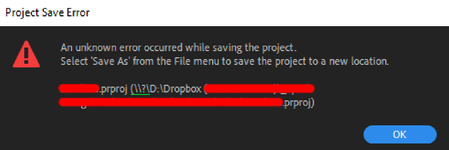
"Unknown Error" when saving an Adobe Premire Pro project directly into a Dropbox folder
I use Dropbox to store most of my files so I can share them easily, so I normaly create the projects directly on a Dropbox sync folder on my PC.
However, since some days ago, I have started get...
- 5 years ago
Thanks for the update Agirres.
In this case then, this might be caused by the syncing process when our app is running while you're also working on Adobe Premiere Pro.
Apart from quitting the app when working on your files through Adobe's Premiere Pro, you might also be able to work-around this issue by pausing the sync.
I know it's not much, but I sure hope this helps to some extent.
Please let me know if there's anything else I can assist with.


LaurenceSpliceFilms
5 years agoExplorer | Level 3
Yup, I also get this issue. Frustrating because I switched from Google Drive to dropbox because I was getting errors saving C4D into Drive, now on Dropbox I get this issue with Premiere! Everything else is fine though.
I have the exact same error message as the OP.

Lusil Dropbox Staff
5 years agoDropbox StaffHey YoniL and LaurenceSpliceFilms, thanks for nudging us on this thread.
As Walter mentions above, could you let us know if you can prevent the error message from appearing by pausing sync before editing the file, and resuming syncing after you've closed the third party app?
Keep us posted!
- LaurenceSpliceFilms5 years agoExplorer | Level 3
Thanks! Yes, pausing syncing on the Dropbox app works and allows me to save in Premiere. Once I close Premiere and resume syncing it seems to be fine.
Not sure if this is helpful but I noticed in the folder where the premiere file is saved, it seems to create a bunch of weirdly named files. I've attached a screengrab for reference.
So the only way to save the file while dropbox is actively syncing is to do "Save As", hence why there's 10 versions. Everytime I tried a normal "Save" it would create those additional files with the crazy names!
Hope that helps.
- Lusil5 years ago
Thanks for the additional information, LaurenceSpliceFilms.
It looks like the files you're seeing are asset files created by the third party app, to enable it to open the project in question.
For this reason, I'd recommend pausing syncing before opening the file, saving any changes you make, closing the third party app after you're done, and resuming syncing again.
Let us know if you have any trouble even after doing this or if you have any other questions. Cheers!
- LaurenceSpliceFilms5 years agoExplorer | Level 3
Okay that's a temporary workaround but hopefully this can be fixed - it doesn't do this on my Mac in the same scenario and it's disruptive to the workflow.
Thanks.
About Create, Upload, and Share
Find help to solve issues with creating, uploading, and sharing files and folders with Dropbox.
The Dropbox Community team is active from Monday to Friday. We try to respond to you as soon as we can, usually within 2 hours.
If you need more help you can view your support options (expected response time for an email or ticket is 24 hours), or contact us on X, Facebook or Instagram.
For more info on available support options for your Dropbox plan, see this article.
If you found the answer to your question in this Community thread, please 'like' the post to say thanks and to let us know it was useful!


