We’re Still Here to Help (Even Over the Holidays!) - find out more here.
Forum Discussion

gcuster
4 years agoNew member | Level 2
Upload Failed
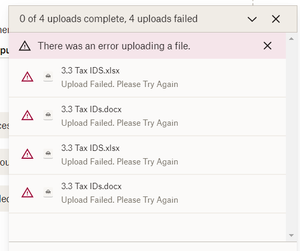
Getting 'there was an error uploading a file'. No explanation. tried a word and excel document via Add by Computer. First time using drop box.
Thanks

GoodLady
3 years agoNew member | Level 2
I am using a desktop on-line to upload large files. I have tried this several times and ended up deleting half uploaded files after a day of constant uploading.
i am using Xfinity and I have their increased upload speed.
I am back trying again for the last time. If this doesn't work i am going to Google.
The current estimate is one day left. Nothing else is running.
This is only half of my uploads.
How can I increase the upload speed.
I do not find anywhere on my screen that gives me access to settings.
- Hannah3 years ago
Dropbox Community Moderator
Hey GoodLady, thanks for bringing this to our attention.
Are you trying to upload the files through our website?
How much data are you trying to upload? Is it more than 50 GB of files?
Keep me posted.
- GoodLady3 years agoNew member | Level 2
It is 12,00 files 11.1gb.
3 days left.
This is useless to me.
I can copy it to a hard drive and store it o ff site faster than this.
- GoodLady3 years agoNew member | Level 2
desktop on line to your web site. Is there any other way to upload
12,000 files 11.1gb
3 days left

About Create, upload, and share
Find help to solve issues with creating, uploading, and sharing files and folders in Dropbox. Get support and advice from the Dropbox Community.
The Dropbox Community team is active from Monday to Friday. We try to respond to you as soon as we can, usually within 2 hours.
If you need more help you can view your support options (expected response time for an email or ticket is 24 hours), or contact us on X, Facebook or Instagram.
For more info on available support options for your Dropbox plan, see this article.
If you found the answer to your question in this Community thread, please 'like' the post to say thanks and to let us know it was useful!


