Your workflow is unique 👨💻 - tell us how you use Dropbox here.
Forum Discussion

nuttygamer
1 year agoExplorer | Level 3
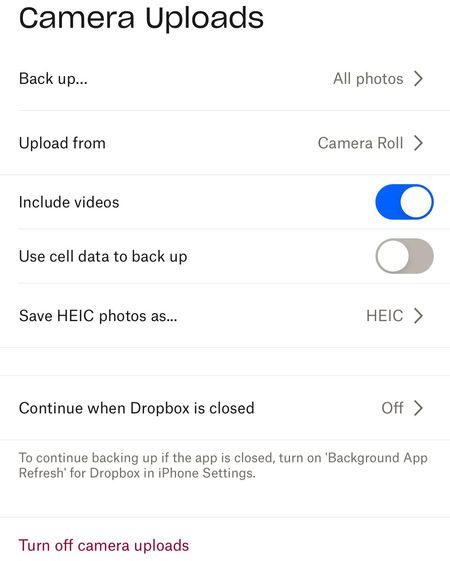
Videos are getting automatically uploaded as .mov and not HEVC on my iPhone app.
I have already followed this guide
https://help.dropbox.com/create-upload/ios-formats
however, after it is uploaded to Dropbox, it shows up as .mov file
facts of the current situation
...

Здравко
1 year agoLegendary | Level 20
nuttygamer, As zacv noted container formats are independent of encoding formats, despite designed and usually used in some optional relations - you erroneous assume some mandatory relationship that don't exist! In particular HEVC encoding may be packed in any container format (including .mov). 😉 Did you check what encoding is in your .mov file? Post the result...
PS: It's another story that instead of simple sync (what most probably you expect), Dropbox encodes the media (both photos and videos) on its own that may leads to some confusions sometimes. Just keep in mind, Dropbox don't sync them - they are always encoded and packed independently; maybe not in the way you expect. Container format doesn't mandate particular encoding format though! (.mov denotes container format, HEVC is encoding format)

nuttygamer
1 year agoExplorer | Level 3
Except I have had Dropbox successfully upload .hevc files not .mov files. I care about the container not just the encoding.
About Create, Upload, and Share
Find help to solve issues with creating, uploading, and sharing files and folders with Dropbox.
The Dropbox Community team is active from Monday to Friday. We try to respond to you as soon as we can, usually within 2 hours.
If you need more help you can view your support options (expected response time for an email or ticket is 24 hours), or contact us on X, Facebook or Instagram.
For more info on available support options for your Dropbox plan, see this article.
If you found the answer to your question in this Community thread, please 'like' the post to say thanks and to let us know it was useful!


