Your workflow is unique 👨💻 - tell us how you use Dropbox here.
Forum Discussion

Aadne
2 years agoExplorer | Level 3
Way to located the sync problem, since my Mac device is stuck syncing?
Hey!!
I upload plenty of Logic Pro X (music production) projects to my dropbox (over 1 TB now) via dropbox sync backup through a physical external harddisk.
I recieved som sync issues regarding t...

Aadne
2 years agoExplorer | Level 3
Hey Megan! I FINALLY got the rest of the files to upload after some clever thinking -> I found the latest item uploaded to dropbox, checked the date and did some advanced finder searches to find all the projects uploaded that day on my harddisk. Deleting one by one until the problem was solved!
BUT - Dropbox still tells me there's a problem. I got my files up and running so I'm happy, but maybe we could solve this aswell.
My OS is Sonoma 14.1
Dropbox v192.4.4605
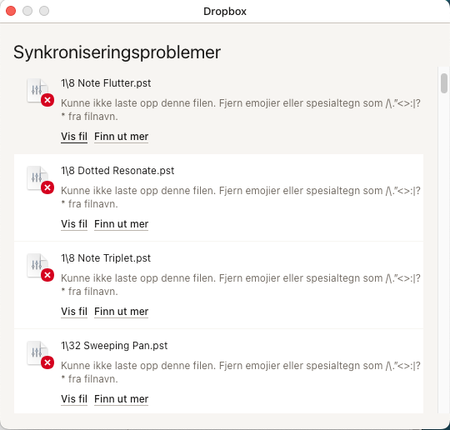
"Could not synchronize files" in Norwegian
"145 problems"
All of the 145 problems are related to ".pst" files including backslash.
the reason I can't just search in finder for the files is because these small files inside Logic projects don't come up when I search for them (it’s presets for an effect plugin on one of the many tracks inside a project if that tells you anything). I need to go deep inside the project folder to actually be able to search for the files. And doing that one-by-one is a time consuming task.

Megan Dropbox Community Moderator
2 years agoDropbox Community ModeratorHi Aadne, glad we're getting there one step at a time!
I definitely see where you're coming from, and it's not ideal, however I'm afraid that doing it one-by-one is the only way that I know of, that this can be done.
Also, the backlash seems to be the culprit of these specific syncing issues, that need to be renamed.
About Create, Upload, and Share
Find help to solve issues with creating, uploading, and sharing files and folders with Dropbox.
The Dropbox Community team is active from Monday to Friday. We try to respond to you as soon as we can, usually within 2 hours.
If you need more help you can view your support options (expected response time for an email or ticket is 24 hours), or contact us on X, Facebook or Instagram.
For more info on available support options for your Dropbox plan, see this article.
If you found the answer to your question in this Community thread, please 'like' the post to say thanks and to let us know it was useful!


