Need to see if your shared folder is taking up space on your dropbox 👨💻? Find out how to check here.
Forum Discussion

DeepFilip
7 years agoNew member | Level 2
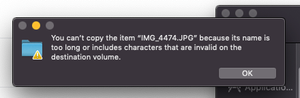
You can't copy the item because its name is too long er includes characters that are invalid on the.
Hi, I have a Dropbox account with 2TB of which 6% is full right now. I am trying to copy a folder that only has a couple of GBs and I am getting this error message. What is wrong with the filename "...
- 7 years agoHey there (DeepFilip), thanks for keeping the thread updated with the progress & apologies for getting back in touch with you with a slight delay. While this has been discussed here previously, I’d happily explain in a bit more depth under this conversation for posterity.It would be worth noting that there are files that your applications can't process correctly because they have file paths that are too long.This behavior is present if there are more than 255 characters in the entire file path. This means from the C:\ all the way to the extension of a file.As an example if you had a test.txt file in your Dropbox that had the following path:
C:\Users\YourName\My Documents\Dropbox\test.txtThis file would have a path that is 47 characters long.The Dropbox desktop application can read and write to locations that are longer than 255 characters, which means that files will sync to and from those locations, however, the applications used to open or save said files (e.g. Word, Notepad, Excel, &c.) might not support reading from or writing to these locations with long file paths and may show error messages when trying to open, save or edit them.Hopefully my message addresses your initial inquiry, however please feel free to check back with us here if you have any additional questions or thoughts!


Jay Dropbox Community Moderator
4 years agoDropbox Community ModeratorHi mev9313, in order to understand what you're experiencing, could you attach a screenshot of what you're seeing on your machine?

mev9313
4 years agoExplorer | Level 4
I have spent hours documenting this problem for Dropbox Support. Here's one example, where the error message says the file can't be uploaded due to incompatible characters. On the right, you see the dropbox menu where it did actually upload not once, but twice.
d
- mev93134 years agoExplorer | Level 4
Ticket #15994964
Assigned to: John
Honestly, I've about given up on this. All support has done is wait 48 hours and then give me another task to do. In the meantime, I'm trying to get my files backed up and get back to work. Dropbox has been great for many years, but I'm looking for other solutions since this has been such a pain and taken so much time up.
- Walter4 years ago
Hey mev9313, thanks for the ticket ID - much appreciated!
I was able to locate on our system and passed your comments there in order to have all the relevant information in one place.
If you'd like further assistance on this, I'd recommend getting back to the expert handling your case.
Let us know if you have anything else to add or ask in the meantime.
PS: I'm not sure if you've tried this, but does the issue persist after renaming the problematic files or shortening their file-paths?
- mev93134 years agoExplorer | Level 4
My latest workaround is to copy the items one at a time into dropbox, then move them into a folder.
This example shows the inconsistencies in the dropbox errors.
I moved the folder SEPTEMBER/OCTOBER VERSIONS and it copied with no problem. Inside it is a folder called TH21-Derm-Excision Referrals.
I had a second, later version of TH21-Derm-Excision Referrals that I moved to the same folder as SEPTEMBER/OCTOBER (but not in SEPTEMBER/OCTOBER). It came back with the "too long/incompatible character" error a couple of files. I selected each file in error and moved it individually. No problem. I then created a new folder with the same name and moved them into the folder. Again, no problem.
I'll share this latest revelation with my expert, but he's really been no help at all to this point.
 kylestauffer4 years agoNew member | Level 2
I've been battling this for a month now. I'm attempting to move our file archive of 64TB(!) onto DB and keep getting these stupid errors. They're random. Sometimes it's one folder, the next it's one inside it. They're all short file names, and no special characters. It's a bug, despite what support says. I don't even know that I can trust DB to have all the files and not corrupt at this point.
I'm on MacOS High Sierra on that machine.
- Walter4 years ago
Hey kylestauffer, sorry to hear about this.
Can you send us a screenshot of the exact error you're getting so that we can have a visual too?
Also, have you tried doing this in smaller batches of files or through a web browser instead? Do you also get an error there?


About Create, upload, and share
Find help to solve issues with creating, uploading, and sharing files and folders in Dropbox. Get support and advice from the Dropbox Community.
The Dropbox Community team is active from Monday to Friday. We try to respond to you as soon as we can, usually within 2 hours.
If you need more help you can view your support options (expected response time for an email or ticket is 24 hours), or contact us on X, Facebook or Instagram.
For more info on available support options for your Dropbox plan, see this article.
If you found the answer to your question in this Community thread, please 'like' the post to say thanks and to let us know it was useful!


