Need to see if your shared folder is taking up space on your dropbox 👨💻? Find out how to check here.
Forum Discussion

Randyalan99
3 years agoHelpful | Level 5
Clarification Storage Quota Full but no changes after deletion of files.
Hello, I am having an issue many seem to be having where my quota storage is full, but not matter how many files/folders I delete (whether that's team shared, shared with me, or personal) nothing...
 3 years ago
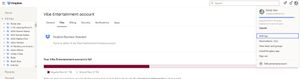
I just logged in after sleeping on this. Haha you are right. And I just found in the admin console where it says, the quota refreshes every 8 hours. Seems crazy it takes that long to update your usage.

Mark Super User II
3 years agoSuper User IIHi Randyalan99
Have you accidentally activated Backups? www.dropbox.com/backups
- Randyalan993 years agoHelpful | Level 5No backups unfortunately.
- Mark3 years ago
If you are on a Team account as ridiculous as it sounds it can take a few hours to update.
If it doesnt work after that I'd suggest contacting support
- Randyalan993 years agoHelpful | Level 5
I just logged in after sleeping on this. Haha you are right. And I just found in the admin console where it says, the quota refreshes every 8 hours. Seems crazy it takes that long to update your usage.
About Storage Space
Looking for help with managing the storage space in your Dropbox account? Talk to the Dropbox Community and get advice from members.
The Dropbox Community team is active from Monday to Friday. We try to respond to you as soon as we can, usually within 2 hours.
If you need more help you can view your support options (expected response time for an email or ticket is 24 hours), or contact us on X, Facebook or Instagram.
For more info on available support options for your Dropbox plan, see this article.
If you found the answer to your question in this Community thread, please 'like' the post to say thanks and to let us know it was useful!


