Your workflow is unique 👨💻 - tell us how you use Dropbox here.
Forum Discussion

linia
10 days agoExplorer | Level 4
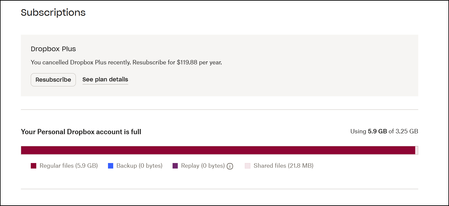
Dropbox is telling me I'm using ~6GB of storage when I have much less.
Hi there, I've recently switched to the free version of Dropbox after being a member for many, many years, because the new features that allow opening and commenting in documents within Dropbox wasn...
- 10 days ago
Thanks for taking the time to post to our Community, linia.
Let's see what we can find out about this.
Regarding the deleted files, they don't take up space in your account, so permanently deleting them wouldn't free up any extra space.
Now, since all the sizes of the folders in your screenshot show the > (bigger than) symbol, would it be possible to open each folder to find out the exact size for each one and see if that brings up the size to the one shown in your settings?
I understand that'd be pretty tedious, but I just want to be sure.
Let me know what you find!

Hannah Dropbox Community Moderator
10 days agoDropbox Community ModeratorThanks for taking the time to post to our Community, linia.
Let's see what we can find out about this.
Regarding the deleted files, they don't take up space in your account, so permanently deleting them wouldn't free up any extra space.
Now, since all the sizes of the folders in your screenshot show the > (bigger than) symbol, would it be possible to open each folder to find out the exact size for each one and see if that brings up the size to the one shown in your settings?
I understand that'd be pretty tedious, but I just want to be sure.
Let me know what you find!
About Storage Space
Looking for help with managing the storage space in your Dropbox account? Talk to the Dropbox Community and get advice from members.
The Dropbox Community team is active from Monday to Friday. We try to respond to you as soon as we can, usually within 2 hours.
If you need more help you can view your support options (expected response time for an email or ticket is 24 hours), or contact us on X, Facebook or Instagram.
For more info on available support options for your Dropbox plan, see this article.
If you found the answer to your question in this Community thread, please 'like' the post to say thanks and to let us know it was useful!


