Need to see if your shared folder is taking up space on your dropbox 👨💻? Find out how to check here.
Forum Discussion

elena19
3 years agoExplorer | Level 3
"Drpobox full" but I have deleted all files and deactivated backup
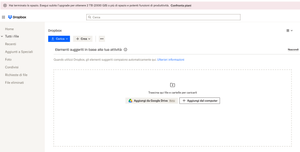
Hi, as stated in the subject, I get the message of full storage (both from the desktop app and the online account) but I deleted all files, including shared ones. I checked the backup settings and no...
- 3 years ago
Hi elena19, can you check if you have any folders shown here: https://www.dropbox.com/backups/PC?
If so, can you try to delete them?
If the issue remains, don't hesitate to let me know!


Jay Dropbox Community Moderator
3 years agoDropbox Community ModeratorHi elena19, thanks for bringing this to our attention.
Can you check to see if there is a backup on the site still taking up your quota?
Keep me updated with any progress!

elena19
3 years agoExplorer | Level 3
Hi Jay, thank you for your reply.
I checked the link you sent and I confirm that there's no backup there
- Megan3 years ago
Hi elena19, can you check if you have any folders shown here: https://www.dropbox.com/backups/PC?
If so, can you try to delete them?
If the issue remains, don't hesitate to let me know!
- elena193 years agoExplorer | Level 3
Hi Megan, I tried your solution but I noticed the browser was redirecting to https://www.dropbox.com/backup/all
So, since I'm on a Mac, I tried this https://www.dropbox.com/backups/Mac and it worked. I finally found where the files from the (unwanted and I don't really know how or when it was activated) backup were kept. The files have bene deleted and the capacity fully restored.
Thank you very much for your help, without your input I never would have guessed where the backup was stored (and, if I may, that's not very user friendly).
Have a good day
Elena
About Storage Space
Looking for help with managing the storage space in your Dropbox account? Talk to the Dropbox Community and get advice from members.
The Dropbox Community team is active from Monday to Friday. We try to respond to you as soon as we can, usually within 2 hours.
If you need more help you can view your support options (expected response time for an email or ticket is 24 hours), or contact us on X, Facebook or Instagram.
For more info on available support options for your Dropbox plan, see this article.
If you found the answer to your question in this Community thread, please 'like' the post to say thanks and to let us know it was useful!


