We’re Still Here to Help (Even Over the Holidays!) - find out more here.
Forum Discussion

carnoustiegolfer
11 months agoNew member | Level 1
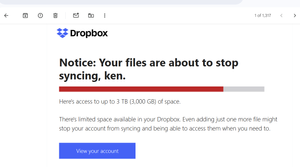
Email says I'm out of space and files not syncing, but I have over 500MB left from 2GB.
Got an email saying I'm out of space and asking me to upgrade, now files are not accessible, but account shows space is available, is this a scam to get upgrade fees?
Also can't seem to speak to an...

carnoustiegolfer
11 months agoNew member | Level 1
I'm still getting all sorts of errors when I try and access or download files from dropbox, and not large files either. For example below when trying to upload to a 3rd party site. Even when trying to open in file explorer or attach to an email. I can see the files when in dropbox as you suggest but when I download from there nothing is downloaded!
I don't mind upgrading to more disk space but I'm now not confident that this will solve the issue :)
About Storage Space
Looking for help with managing the storage space in your Dropbox account? Talk to the Dropbox Community and get advice from members.
The Dropbox Community team is active from Monday to Friday. We try to respond to you as soon as we can, usually within 2 hours.
If you need more help you can view your support options (expected response time for an email or ticket is 24 hours), or contact us on X, Facebook or Instagram.
For more info on available support options for your Dropbox plan, see this article.
If you found the answer to your question in this Community thread, please 'like' the post to say thanks and to let us know it was useful!


