Your workflow is unique 👨💻 - tell us how you use Dropbox here.
Forum Discussion

conalwn
2 years agoHelpful | Level 5
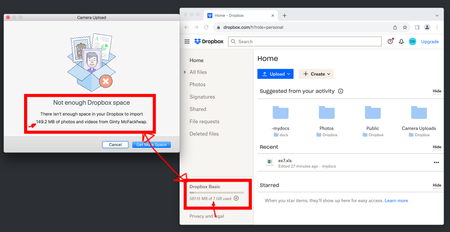
Getting a 'not enough Dropbox space' error, when I have plenty of space
Everyday I get this (see screenshot) on Mac Os when connecting any device to sync photos. "Not enough dropbox space" - Mac - But I have PLENTY of space.. and I see it on both of my macs but not my ip...
 2 years ago
Hi conalwn,
I'm happy to hear that everything is back in working order! It's possible that your cache wasn't properly clearing upon signing out and back in, which is the usual operation that would clear out the cached files causing this error message. This problem seems to have resolved itself while we were investigating.
For anyone else receiving this error message, sign out, then sign back in to clear your cached files. If that doesn't work, please let me know and we can take a deeper look!
Regards,
Ben

Megan Dropbox Community Moderator
2 years agoDropbox Community ModeratorHey all, thanks for bringing this to our attention!
Out team keeps an eye on this, and we will let you know more about this, once we have further news.
Thanks again!

conalwn
2 years agoHelpful | Level 5
Great - thanks - Definitely mac client. Let me know what further information you need.
- conalwn2 years agoHelpful | Level 5
Hannah Jay Calvin2DBX - any ideas? Thanks
- conalwn2 years agoHelpful | Level 5
@Hannah @Jay @CalvinDBX - any updates? Thanks
- BenDBX2 years ago
Community Manager
Hi Everybody,
We have implemented a change that should fix these error messages. Please quit and restart your Dropbox app for this change to take effect.
conalwn Gladya1 and any other users who have received this error, let me know if this has fixed the problem for you. If not, I'll inform the appropriate team so that we can take another look.
Regards,
Ben
- conalwn2 years agoHelpful | Level 5
Hello
Tested a number of times, after dropbox restart and then after macbook restart.
Issue is still present with dropbox only 40% full.
As an experiment, I also deleted the dropbox.cache directory and replaced it with a version from when I freshly installed the application.. but no joy there either (I had long suspected the cache as being a culprit).
- BenDBX2 years ago
Hi conalwn,
Thanks for your patience. Information from large uploads can be stored within the app. You may have already attempted this, but you can try signing out and signing back in to clear any data stored within the app.
Can you confirm the device that you're using? The team member I'm in contact with is requesting this information to assist further.
Regards,
Ben
- BenDBX2 years ago
Hi conalwn,
I'm happy to hear that everything is back in working order! It's possible that your cache wasn't properly clearing upon signing out and back in, which is the usual operation that would clear out the cached files causing this error message. This problem seems to have resolved itself while we were investigating.
For anyone else receiving this error message, sign out, then sign back in to clear your cached files. If that doesn't work, please let me know and we can take a deeper look!
Regards,
Ben
- conalwn2 years agoHelpful | Level 5
So... next support question. What application does dropbox recommend as the best alternative to dropbox?
 keemao2 years agoNew member | Level 2
Hi, Ben. I have been getting the dropbox full error for a long time now. I deleted everything, signed out and in again and still it says full. I restored some of the files I deleted although it still shows full regardless of what I do. Cleared cache, nothing changed. I never used to have this problem until recently for years of using the free dropbox. What can I do to solve this problem and see what space I actually have? In the past I had plenty more than what I have now and it never showed full.
 LorsiR2 years agoNew member | Level 2
Hi Ben,
I upgraded my dropbox account on November 10th from Basic to Dropbox Plus. I keep getting a message saying I have used all my space which is incorrect. I have logged out and in again but I'm still getting the message. Any advice?
 Magicmothswarm1 year agoNew member | Level 2I just started a business account and I should have plenty of space to upload files but is telling me that after 136 gb of uploading that “there is not enough space”. I set it up so I have no limit for uploading so I’m quite confused as to why it’s stopped me from uploading further
- conalwn1 year agoHelpful | Level 5
It's the database file in my case, there's a bug causing it to get filled up, so I had the remove the file. Is it just images you're having a problem with?
I have to remove this file (you may want to try moving the file sideways):
rm /Users/YOUR_NAME/.dropbox/instance4/photo.dbxIn your case though I'd find the photo.dbx file, move it somewhere else and then restart dropbox to see if it solves your issue.
I mean, I do love dropbox but it's just been getting worse for about the last years - and then I saw this:
Let me know how you get on.
About Storage Space
Looking for help with managing the storage space in your Dropbox account? Talk to the Dropbox Community and get advice from members.
The Dropbox Community team is active from Monday to Friday. We try to respond to you as soon as we can, usually within 2 hours.
If you need more help you can view your support options (expected response time for an email or ticket is 24 hours), or contact us on X, Facebook or Instagram.
For more info on available support options for your Dropbox plan, see this article.
If you found the answer to your question in this Community thread, please 'like' the post to say thanks and to let us know it was useful!


