Your workflow is unique 👨💻 - tell us how you use Dropbox here.
Forum Discussion

conalwn
2 years agoHelpful | Level 5
Getting a 'not enough Dropbox space' error, when I have plenty of space
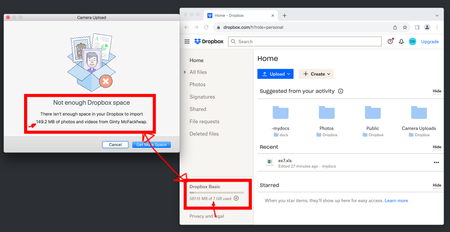
Everyday I get this (see screenshot) on Mac Os when connecting any device to sync photos. "Not enough dropbox space" - Mac - But I have PLENTY of space.. and I see it on both of my macs but not my ip...
 2 years ago
Hi conalwn,
I'm happy to hear that everything is back in working order! It's possible that your cache wasn't properly clearing upon signing out and back in, which is the usual operation that would clear out the cached files causing this error message. This problem seems to have resolved itself while we were investigating.
For anyone else receiving this error message, sign out, then sign back in to clear your cached files. If that doesn't work, please let me know and we can take a deeper look!
Regards,
Ben

Megan Dropbox Community Moderator
2 years agoDropbox Community ModeratorHey all, thanks for bringing this to our attention!
Out team keeps an eye on this, and we will let you know more about this, once we have further news.
Thanks again!

Georgina Wade
2 years agoNew member | Level 2
Hi Megan
Thanks for the reply. I think the system is ignoring the space that was granted by referring people to DropBox. In my case I have an extra 6.25 GB but usage message is not taking it into account. Has something changed in the calculation of free space?
Georgina
 Gladya12 years agoExplorer | Level 3I originally had 6 gb of space. I received 100 gb free (new HP laptop purchased). Now I have 102 gb space. You think dropbox uses a calculator? I’m not going to bother asking about it.
About Storage Space
Looking for help with managing the storage space in your Dropbox account? Talk to the Dropbox Community and get advice from members.
The Dropbox Community team is active from Monday to Friday. We try to respond to you as soon as we can, usually within 2 hours.
If you need more help you can view your support options (expected response time for an email or ticket is 24 hours), or contact us on X, Facebook or Instagram.
For more info on available support options for your Dropbox plan, see this article.
If you found the answer to your question in this Community thread, please 'like' the post to say thanks and to let us know it was useful!


